Entra Kerberos for cloud-only identities: what the Azure Files preview requires and how it differs from hybrid

Since 18 November, Microsoft Entra Kerberos can issue Kerberos tickets for Azure Files to users that exist only in Entra ID, in public preview. For Azure Virtual Desktop with Entra-joined session hosts that removes one of the main reasons to keep AD DS and Entra Connect around: FSLogix profiles on an SMB share. The setup looks like the hybrid scenario, but authorization works differently, and one mandatory step only appeared in the documentation after the announcement. Below: what the preview requires, where it differs from hybrid and what doesn't work yet.
 Photo: Massimiliano Morosinotto on Unsplash
What was announced and how the tickets flow
The announcement (AZ527713 and the Azure Storage blog post) went out on 18 November, the first day of Ignite, after a private preview that started in September according to the Azure update timeline. The scope is narrow: Entra-joined Windows clients, cloud-only users, SMB access to Azure Files, with AVD and FSLogix profile containers as the main use case. Introduction to Microsoft Entra Kerberos lists Azure Files and Azure Virtual Desktop as the only supported workloads for cloud-only identities. The storage side is in Enable Microsoft Entra Kerberos authentication for hybrid and cloud-only identities.
The client side works the same as in hybrid. At sign-in the device gets a Cloud TGT for the realm KERBEROS.MICROSOFTONLINE.COM next to the PRT, and when the user opens the share, Windows requests a service ticket for
The client side works the same as in hybrid. At sign-in the device gets a Cloud TGT for the realm KERBEROS.MICROSOFTONLINE.COM next to the PRT, and when the user opens the share, Windows requests a service ticket for
cifs/<account>.file.core.windows.net from Entra ID through the KDC proxy. Entra ID encrypts that ticket with the key of the service principal it created for the storage account. The difference is in what the ticket carries. In the hybrid scenario it carries the user's on-premises SIDs, which is why NTFS ACLs written against AD accounts keep working and why ACLs for identities that aren't synced are never enforced. A cloud-only user has no on-premises SID, so the ticket carries the Entra SIDs of the user and their cloud groups: the securityIdentifier property in Graph, as opposed to onPremisesSecurityIdentifier. The AzureADKerberos object in AD that hybrid needs isn't required at all, according to the Entra Kerberos FAQ. 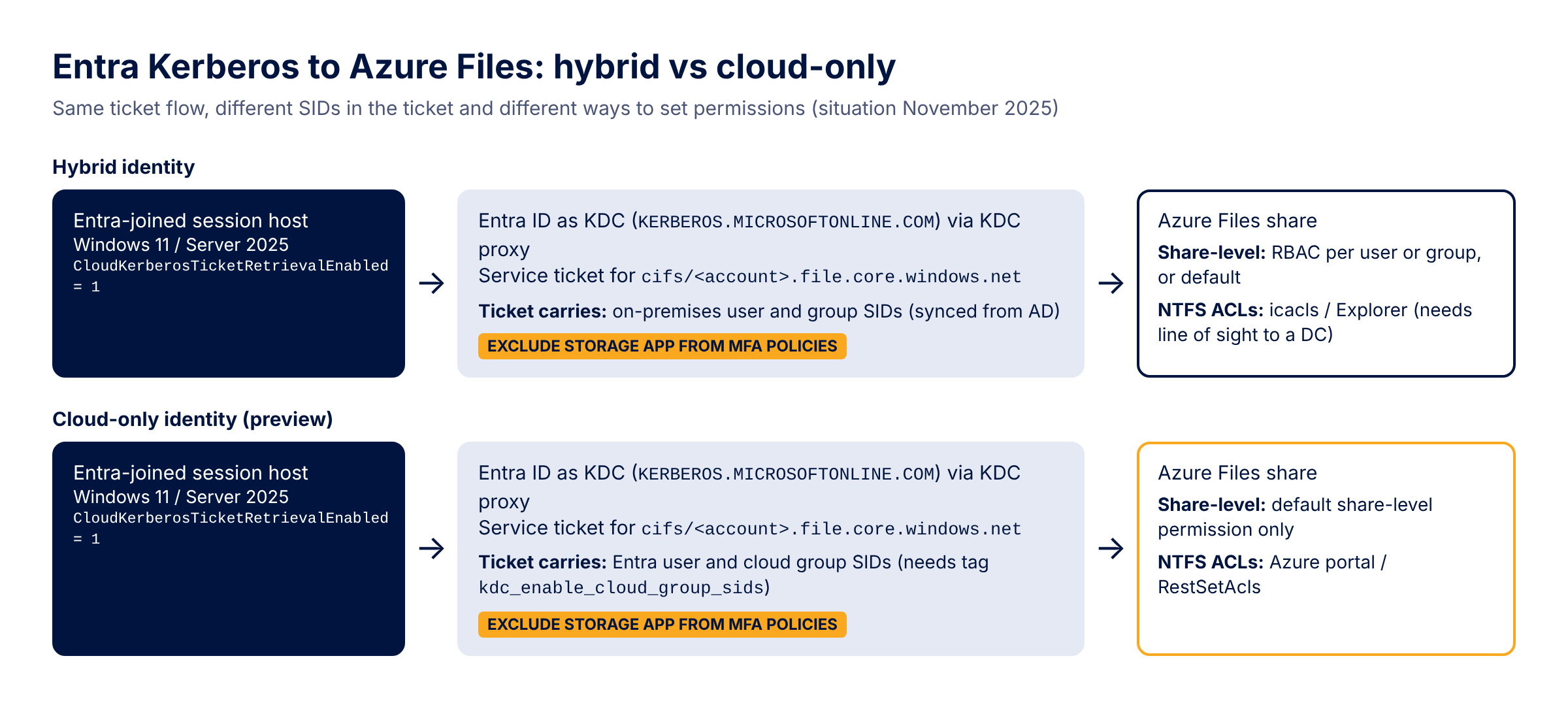
Prerequisites for the cloud-only preview
As the documentation stands this week, a working setup needs all of these:
- A storage account in the Azure public cloud with Microsoft Entra Kerberos as its only identity source. US Gov and 21Vianet are hybrid-only.
- Entra-joined clients running Windows 11 Enterprise or Pro (single or multi-session) or Windows Server 2025 with the latest cumulative update. Windows 10 and Server 2022 are supported for hybrid identities only. The Entra Kerberos overview page says Windows 10 or 11 for cloud-only, but the Azure Files page is the one with the explicit list, and I'd go with that.
- CloudKerberosTicketRetrievalEnabled set to 1 on every client. On AVD multi-session, deploy it through the Intune Settings Catalog: the documentation states the OMA-URI route doesn't work on multi-session hosts.
- The WinHTTP Web Proxy Auto-Discovery Service and the IP Helper service running. Disabling WPAD is fine, disabling the service isn't.
- Admin consent on the app registration named
[Storage Account] <account>.file.core.windows.netfor openid, profile and User.Read. - The tag kdc_enable_cloud_group_sids on that same app registration (next section).
- The storage account app excluded from every Conditional Access policy that requires MFA. Without the exclusion,
net usefails with system error 1327 ("Account restrictions are preventing this user from signing in"). The way I read it, MFA belongs at the Windows or AVD sign-in, because the ticket request to the storage app has no way to answer an MFA challenge. - A default share-level permission on the storage account, because cloud-only identities can't get share-level RBAC per user or group in this preview.
- If clients reach the account through a private endpoint, the privatelink FQDN added to the app registration, as with hybrid.
The mandatory manifest tag and the group SID limit
The step most people will miss is the tag. According to the public docs repositories, the Azure Files article got its section "Enable cloud-only groups support (mandatory for cloud-only identities)" late on 19 November, and those instructions moved to the Entra Kerberos page on 20 November. Anyone who set this up from the launch-day docs doesn't have it, and without the tag, authentication for cloud-only users fails.
The reason is ticket size. A Kerberos ticket holds at most 1,010 group SIDs, and with cloud-only support the ticket has to carry cloud group SIDs on top of any on-premises ones. According to the Entra Kerberos page, the tag tells the Kerberos service that requests for this resource involve cloud-only identities, which (as the name says) enables cloud group SIDs in the ticket. A user over the limit signs in fine and gets a PRT, then fails when requesting the service ticket, and the Entra sign-in log shows error 140011, KerberosUsersGroupNumberExceeded. The Entra Kerberos page contradicts itself here: one section says groups beyond 1,010 are left out, the section on the tag says the ticket can't be issued. I'd plan for the failure.
The documented PowerShell example runs
The reason is ticket size. A Kerberos ticket holds at most 1,010 group SIDs, and with cloud-only support the ticket has to carry cloud group SIDs on top of any on-premises ones. According to the Entra Kerberos page, the tag tells the Kerberos service that requests for this resource involve cloud-only identities, which (as the name says) enables cloud group SIDs in the ticket. A user over the limit signs in fine and gets a PRT, then fails when requesting the service ticket, and the Entra sign-in log shows error 140011, KerberosUsersGroupNumberExceeded. The Entra Kerberos page contradicts itself here: one section says groups beyond 1,010 are left out, the section on the tag says the ticket can't be issued. I'd plan for the failure.
The documented PowerShell example runs
Update-MgApplication -Tags @("kdc_enable_cloud_group_sids"), and the Graph PATCH it sends replaces the entire tags collection. Every storage account has its own app registration, so this needs doing per account. I'd report first and then append, scoped to the accounts you intend to use for cloud-only users: Connect-MgGraph -Scopes "Application.ReadWrite.All"
# Report: all storage account app registrations and whether they carry the tag
Get-MgApplication -All -Filter "startswith(displayName,'[Storage Account]')" -Property Id, DisplayName, Tags |
Select-Object DisplayName, @{ n = 'CloudGroupSids'; e = { $_.Tags -contains 'kdc_enable_cloud_group_sids' } }
# Append the tag for one storage account without dropping existing tags
$name = '[Storage Account] <account>.file.core.windows.net'
$app = Get-MgApplication -Filter "displayName eq '$name'" -Property Id, Tags
if ($app.Tags -notcontains 'kdc_enable_cloud_group_sids') {
$tags = @($app.Tags | Where-Object { $_ }) + 'kdc_enable_cloud_group_sids'
Update-MgApplication -ApplicationId $app.Id -Tags $tags
}
To find users near the limit before they hit it, count transitive group memberships. It's an approximation, since the documentation doesn't say exactly which groups end up in the ticket, but it shows who is close:
Connect-MgGraph -Scopes "User.Read.All", "GroupMember.Read.All"
$upn = '<user@domain>'
Get-MgUser -UserId $upn -Property UserPrincipalName, SecurityIdentifier | Select-Object UserPrincipalName, SecurityIdentifier
(Get-MgUserTransitiveMemberOfAsGroup -UserId $upn -All -Property Id, SecurityEnabled |
    Where-Object SecurityEnabled).Count
Authorization comes down to one default permission and your ACLs
With hybrid identities you can grant share-level access per user or group with the Storage File Data SMB Share roles. Cloud-only identities can only use the default share-level permission, which applies to all authenticated identities and to every file share in the storage account. Everyone in the tenant who can get a ticket for the account passes the share-level check, and the only per-user boundary left is the NTFS ACL.
That makes the root ACL important. The documented default ACL on the root of an Azure file share includes
Setting those ACLs works differently from hybrid. icacls and File Explorer don't work for cloud-only identities; you use Manage access in the Azure portal (the documentation points to https://aka.ms/portal/fileperms for this) or the RestSetAcls module with Add-AzFileAce. The documented RestSetAcls example builds its storage context with the account key, so on an account where you've disabled Shared Key authorization that example won't run as written. The Entra Kerberos overview page also says there's "no NTFS ACL enforcement" for cloud-only and that authorization uses Azure RBAC. That doesn't match the Azure Files documentation, which describes ACLs for cloud-only users and a default share-level permission only. For the share itself I follow the Azure Files pages.
That makes the root ACL important. The documented default ACL on the root of an Azure file share includes
NT AUTHORITY\Authenticated Users:(OI)(CI)(M). Set the default share-level permission to Storage File Data SMB Share Contributor (what FSLogix setups typically use) and leave the root alone, and every authenticated user can modify everything on every share in that account. For FSLogix I'd apply the FSLogix recommended ACLs before the first user signs in: CREATOR OWNER with Modify on subfolders and files only, the user group with Modify on this folder only, an admin group with Full Control, and inheritance from the root removed. I'd also put shares with different audiences in different storage accounts, because the default permission can't tell them apart.Setting those ACLs works differently from hybrid. icacls and File Explorer don't work for cloud-only identities; you use Manage access in the Azure portal (the documentation points to https://aka.ms/portal/fileperms for this) or the RestSetAcls module with Add-AzFileAce. The documented RestSetAcls example builds its storage context with the account key, so on an account where you've disabled Shared Key authorization that example won't run as written. The Entra Kerberos overview page also says there's "no NTFS ACL enforcement" for cloud-only and that authorization uses Azure RBAC. That doesn't match the Azure Files documentation, which describes ACLs for cloud-only users and a default share-level permission only. For the share itself I follow the Azure Files pages.
What doesn't work yet compared to hybrid
Compared to hybrid Entra Kerberos, the preview lacks:
- Share-level RBAC for individual cloud-only users or groups.
- ACL management with icacls or File Explorer.
- Reuse of existing ACLs. ACLs copied from an AD-based share reference on-premises SIDs that a cloud-only user's ticket doesn't contain, so moving users to cloud-only means setting the ACLs again for their Entra SIDs.
- Windows 10, Windows Server 2022, and the US Gov and 21Vianet clouds.
- Guests and users from other tenants, except external identities for FSLogix on AVD, which the documentation explicitly allows.
ksetup /addhosttorealmmap), which matters if you migrate FSLogix from an AD DS share to a cloud-only share in steps. A storage account still has exactly one identity source, so switching from AD DS means disabling it first, and with it identity-based access to that account. Checking a session host and the storage account
On the session host, as the user:
dsregcmd /status                                      # SSO State: AzureAdPrt YES, CloudTgt YES
klist cloud_debug                                     # "Cloud Kerberos enabled by policy" should be 1
klist get "cifs/<account>.file.core.windows.net"      # service ticket from KERBEROS.MICROSOFTONLINE.COM
For the account,
Debug-AzStorageAccountAuth from AzFilesHybrid 0.3.0 or later runs the Entra checks, and Az.Storage shows the configuration: (Get-AzStorageAccount -ResourceGroupName '<resource-group>' -Name '<account>').AzureFilesIdentityBasedAuth |
Format-List DirectoryServiceOptions, DefaultSharePermission # expect AADKERB
Before giving a pilot group access, check each storage account app for the kdc_enable_cloud_group_sids tag and replace the Authenticated Users entry on the share root with the FSLogix ACLs.
Update March 2026: The Azure Files article now lists app management policies as a prerequisite. If a tenant policy blocks password (symmetric key) addition on service principals or limits their lifetime to less than 366 days, enabling Entra Kerberos fails until you adjust the policy or grant an exception for the Storage Resource Provider (app ID a6aa9161-5291-40bb-8c5c-923b567bee3b). See the prerequisites.
Update May 2026: Entra-only identities for Azure Files became generally available (AZ562359). Cloud-only users and groups can now get share-level RBAC per identity, initially in a subset of Azure regions, so the default share-level permission is no longer the only option. The manifest tag is still mandatory. See Assign share-level permissions.
Update August 2026: Share-level RBAC for specific cloud-only users and groups is now supported in all public Azure regions, per Assign share-level permissions.
Update March 2026: The Azure Files article now lists app management policies as a prerequisite. If a tenant policy blocks password (symmetric key) addition on service principals or limits their lifetime to less than 366 days, enabling Entra Kerberos fails until you adjust the policy or grant an exception for the Storage Resource Provider (app ID a6aa9161-5291-40bb-8c5c-923b567bee3b). See the prerequisites.
Update May 2026: Entra-only identities for Azure Files became generally available (AZ562359). Cloud-only users and groups can now get share-level RBAC per identity, initially in a subset of Azure regions, so the default share-level permission is no longer the only option. The manifest tag is still mandatory. See Assign share-level permissions.
Update August 2026: Share-level RBAC for specific cloud-only users and groups is now supported in all public Azure regions, per Assign share-level permissions.
Sources
- AZ527713: Public Preview, Entra-only identities support with Azure Files SMB
- Azure Storage blog: Cloud Native Identity with Azure Files, Entra-only secure access
- Enable Microsoft Entra Kerberos authentication for hybrid and cloud-only identities on Azure Files
- Introduction to Microsoft Entra Kerberos (cloud-only identities, group SID limit, manifest tag)
- Microsoft Entra Kerberos FAQ
- Assign share-level permissions for Azure Files
- Configure directory and file-level permissions for Azure file shares
- FSLogix: Configure SMB storage permissions
- Microsoft Graph: user resource type (securityIdentifier)
- AZ562359: Generally Available, Entra-only identities with Azure Files
