PIM iteration 2 APIs stop working in October 2026: finding what still calls them

Microsoft has now put a date on the end of the Privileged Identity Management iteration 2 APIs, everything under /beta/privilegedAccess: from 28 October 2026 calls to them fail. Hardly anyone writes new code against these endpoints, and that is what makes this retirement awkward, because what still calls them is old, often runs unattended with high privileges and was usually written by someone who has since moved on. This post covers how to find those callers with Microsoft Graph activity logs, permission grants, sign-in logs and code search, and what the iteration 3 replacements look like for Entra roles, groups and Azure resources.
 Photo: Fellipe Ditadi on Unsplash
What Microsoft announced
MC1181281, published on 29 October 2025, says that from 28 October 2026 all applications and scripts calling the PIM iteration 2 (beta) APIs for Azure resources, Microsoft Entra roles and groups will fail, because the calls will no longer return data. Microsoft asks you to stop new development on iteration 2 and move to the generally available iteration 3 APIs. At the time of writing the Learn pages haven't caught up yet: the iteration 2 overview in the Graph beta reference still says the API "will be deprecated soon", and the PIM API concepts page says it "will eventually be deprecated". Neither ever carried a date until now.
For context, iteration 2 is the API under
Two details matter before you start searching. The first is a naming trap: the iteration 3 API for PIM for Groups lives at
For context, iteration 2 is the API under
/beta/privilegedAccess with the provider segments aadRoles and azureResources (plus the undocumented aadGroups for groups, which MC1181281 also covers), built on resources such as governanceResource, governanceRoleDefinition, governanceRoleSetting, governanceRoleAssignment and governanceRoleAssignmentRequest. It never went GA. Iteration 1 (/beta/privilegedRoles) was already deprecated in June 2021 and is no longer supported.Two details matter before you start searching. The first is a naming trap: the iteration 3 API for PIM for Groups lives at
/identityGovernance/privilegedAccess/group/..., so a plain search for "privilegedAccess" also returns code that is already migrated. What you are looking for is privilegedAccess directly after /beta/. The second is the failure mode. "No longer return data" doesn't tell you whether your script will throw or quietly receive nothing, and a compliance report that suddenly shows zero eligible assignments is worse than one that crashes. Where iteration 2 calls typically hide
The obvious candidates are PowerShell scripts built on the AzureADPreview module, whose PIM cmdlets (Get-AzureADMSPrivilegedResource, Get-AzureADMSPrivilegedRoleSetting, Open-AzureADMSPrivilegedRoleAssignmentRequest and the rest of the AzureADMSPrivileged family, with
Less obvious is the Microsoft Entra PowerShell beta module, the recommended successor to AzureADPreview. Its Get-EntraBetaPrivilegedResource, Get-EntraBetaPrivilegedRoleDefinition, Get-EntraBetaPrivilegedRoleSetting and Set-EntraBetaPrivilegedRoleSetting take a
Beyond PowerShell, look at Logic Apps and Power Automate flows with HTTP actions against Graph beta, Azure Automation runbooks, activation helpers wired into a ticketing system, and third-party PAM or governance tools that integrated with PIM in the years when iteration 2 was the only API that covered Azure resources.
-ProviderId aadRoles or azureResources) sit on iteration 2. The AzureAD modules have been out of support since 30 March 2025 anyway, and Microsoft's PIM PowerShell migration guidance maps the Azure resource cmdlets to their Az.Resources equivalents.Less obvious is the Microsoft Entra PowerShell beta module, the recommended successor to AzureADPreview. Its Get-EntraBetaPrivilegedResource, Get-EntraBetaPrivilegedRoleDefinition, Get-EntraBetaPrivilegedRoleSetting and Set-EntraBetaPrivilegedRoleSetting take a
-ProviderId such as aadRoles and call the same /beta/privilegedAccess endpoints as the Graph PowerShell beta cmdlets from the *-MgBetaPrivilegedAccess* family, such as Get-MgBetaPrivilegedAccessResource and Update-MgBetaPrivilegedAccessRoleSetting. That is iteration 2. A script that was dutifully migrated from AzureADPreview to Entra PowerShell this year may have moved from one retiring API to the same retiring API. A useful rule of thumb in the Graph SDK: the iteration 3 cmdlets for groups carry IdentityGovernance in their name (New-MgIdentityGovernancePrivilegedAccessGroupEligibilityScheduleRequest), the iteration 2 ones don't.Beyond PowerShell, look at Logic Apps and Power Automate flows with HTTP actions against Graph beta, Azure Automation runbooks, activation helpers wired into a ticketing system, and third-party PAM or governance tools that integrated with PIM in the years when iteration 2 was the only API that covered Azure resources.
Finding the callers in Microsoft Graph activity logs
The most reliable source is Microsoft Graph activity logs, which record every request Graph processes for your tenant, including the full request URI. You need Entra ID P1 and a diagnostic setting that sends the MicrosoftGraphActivityLogs category to a Log Analytics workspace. Logging only starts when you enable it, so if it isn't on yet, enabling it is the first step: a year is enough runway to capture jobs that run monthly, quarterly or once a year, like an annual recertification export.
MicrosoftGraphActivityLogs
| where TimeGenerated > ago(30d)
| extend Path = tolower(replace_regex(tostring(parse_url(RequestUri).Path), @'/+', '/'))
| where Path startswith "/beta/privilegedaccess"
| summarize Requests = count(), LastSeen = max(TimeGenerated),
    Methods = make_set(RequestMethod), Paths = make_set(Path, 10),
    UserAgents = make_set(UserAgent, 5)
    by AppId, ServicePrincipalId, UserId
| sort by Requests desc
AppId and ServicePrincipalId identify the client. A filled UserId means delegated access, typically someone running a script interactively; an empty one means app-only, typically a runbook, a Logic App or a service. The user agent usually tells you whether it's the Graph PowerShell SDK or something else. If a Microsoft first-party client such as the Azure portal shows up, that's Microsoft's to migrate, not yours.
Permission grants and sign-in logs as a second net
Iteration 2 has its own six Graph permissions: PrivilegedAccess.Read and PrivilegedAccess.ReadWrite, each for AzureAD, AzureADGroup and AzureResources. Iteration 3 uses different ones (RoleManagement.\, RoleEligibilitySchedule.\ and RoleAssignmentSchedule.\* for directory roles, PrivilegedEligibilitySchedule.\* and PrivilegedAssignmentSchedule.\* for groups) and no Graph permission at all for Azure resources. So an app that holds a PrivilegedAccess.\* grant is a strong lead. It isn't proof, because grants outlive the code that needed them, but it gives you a list that doesn't depend on log retention.
Connect-MgGraph -Scopes "Application.Read.All", "Directory.Read.All"

$graphSp = Get-MgServicePrincipal -Filter "appId eq '00000003-0000-0000-c000-000000000000'"
$pattern = '^PrivilegedAccess\.(Read|ReadWrite)\.(AzureAD|AzureADGroup|AzureResources)$'
$roleNames = @{}
$graphSp.AppRoles | ForEach-Object { $roleNames[$_.Id] = $_.Value }

$appHits = Get-MgServicePrincipalAppRoleAssignedTo -ServicePrincipalId $graphSp.Id -All |
    Where-Object { $roleNames[$_.AppRoleId] -match $pattern } |
    Select-Object @{ n = 'Client'; e = { $_.PrincipalDisplayName } }, PrincipalId,
        @{ n = 'Type'; e = { 'Application' } }, @{ n = 'Permission'; e = { $roleNames[$_.AppRoleId] } }

$delegatedHits = Get-MgOauth2PermissionGrant -Filter "resourceId eq '$($graphSp.Id)'" -All |
    ForEach-Object {
        $grant = $_
        $grant.Scope -split ' ' | Where-Object { $_ -match $pattern } | ForEach-Object {
            [pscustomobject]@{
                Client      = (Get-MgServicePrincipal -ServicePrincipalId $grant.ClientId).DisplayName
                PrincipalId = $grant.ClientId
                Type        = "Delegated ($($grant.ConsentType))"
                Permission  = $_
            }
        }
    } | Sort-Object PrincipalId, Type, Permission -Unique

@($appHits) + @($delegatedHits) | Sort-Object Client | Format-Table -AutoSize
For every hit, the service principal sign-in logs (and the managed identity sign-in logs for runbooks and Logic Apps with a managed identity) show whether the app still requests tokens for Microsoft Graph, how often and from which IP addresses. Sign-in logs don't show which endpoint was called, so on their own they can't prove iteration 2 use, but combined with the grant they tell you which leads are alive. Where the client is a multitenant app owned by a vendor, ask the vendor for their iteration 3 date in writing.
For the source code, search repositories, exported runbooks and Logic App definitions (export the workflow as an ARM template) for
For the source code, search repositories, exported runbooks and Logic App definitions (export the workflow as an ARM template) for
beta/privilegedAccess/, governanceRole, AzureADMSPrivileged, MgBetaPrivilegedAccess and EntraBetaPrivileged. What the iteration 3 equivalents look like
The iteration 3 APIs split each provider into separate request resources for eligibility and for active assignments, and move Azure resources out of Graph entirely:
- Microsoft Entra roles:
/roleManagement/directory/roleEligibilityScheduleRequestsfor eligible assignments and/roleManagement/directory/roleAssignmentScheduleRequestsfor active assignments and activations, with the current state in the matching*ScheduleInstances. The scope is a directoryScopeId (/or an administrative unit) instead of a governanceResource for the tenant. Role settings move to/policies/roleManagementPoliciesand/policies/roleManagementPolicyAssignmentswith scopeTypeDirectoryRole. - PIM for Groups:
/identityGovernance/privilegedAccess/group/eligibilityScheduleRequestsand.../assignmentScheduleRequests, with accessIdmemberorowner, and policies with scopeTypeGroup. See the PIM for Groups API overview. - Azure resources: Azure Resource Manager, not Graph.
Microsoft.Authorization/roleEligibilityScheduleRequests,roleAssignmentScheduleRequestsandroleManagementPoliciesat the management group, subscription, resource group or resource scope (api-version 2020-10-01, see the REST sample), or New-AzRoleEligibilityScheduleRequest and Update-AzRoleManagementPolicy in Az.Resources. There is no registration step any more, and the caller needs an ARM token plus Owner or User Access Administrator on the scope instead of a Graph permission. For an app registration that means removing the PrivilegedAccess.\*.AzureResources grant and giving the service principal an Azure role.
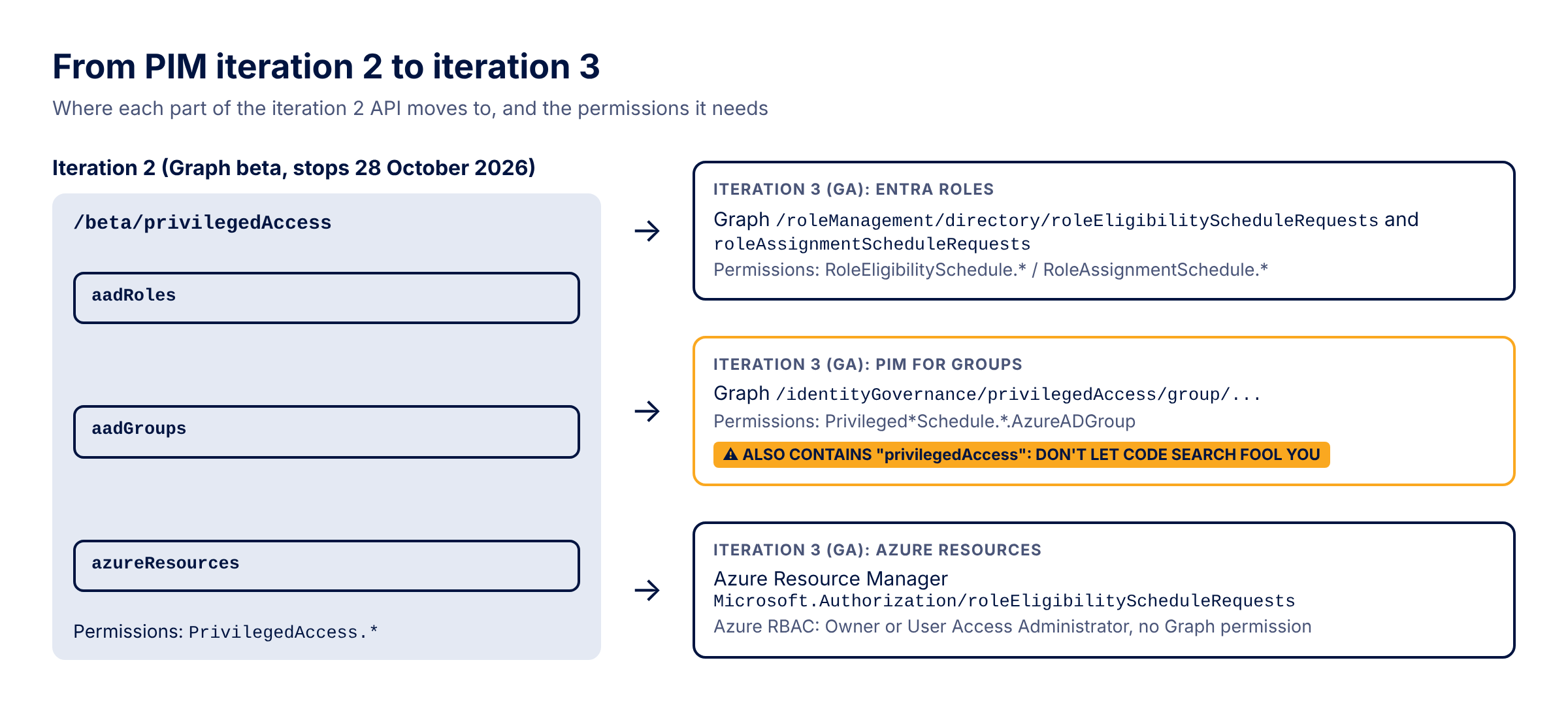
The semantics change as well. Iteration 2 combined a request type with an assignmentState (UserAdd plus Active is an activation, AdminAdd plus Eligible makes someone eligible); iteration 3 uses action values such as
adminAssign, adminRemove, selfActivate and selfDeactivate on the eligibility or assignment request resource. Role settings become 17 rules with fixed IDs such as Expiration_EndUser_Assignment and Approval_EndUser_Assignment, mapped to the admin center in Rules in PIM. A typical self-activation helper looks like this in iteration 3: Connect-MgGraph -Scopes "RoleAssignmentSchedule.ReadWrite.Directory"
$me = (Invoke-MgGraphRequest -Method GET -Uri '/v1.0/me?$select=id').id
$params = @{
Action = "selfActivate"
PrincipalId = $me
RoleDefinitionId = "fe930be7-5e62-47db-91af-98c3a49a38b1" # User Administrator
DirectoryScopeId = "/"
Justification = "CHG0001234"
ScheduleInfo = @{
StartDateTime = (Get-Date).ToUniversalTime()
Expiration = @{ Type = "AfterDuration"; Duration = "PT2H" }
}
}
New-MgRoleManagementDirectoryRoleAssignmentScheduleRequest -BodyParameter $params
Enable the Graph activity log diagnostic setting now, run the permission inventory next to it, and put every app that turns up in either list on a migration board with a named owner and a target date well before the summer of 2026, so the jobs that only run once a quarter still get caught in time.
Update May 2026: Microsoft added a line to the PIM API concepts page saying it is still migrating the PIM user interface itself to the iteration 3 APIs. If the activity log query shows hits from Microsoft's own admin portal clients, leave those out of your migration list and focus on your own apps. See Privileged Identity Management APIs.
Update May 2026: Microsoft added a line to the PIM API concepts page saying it is still migrating the PIM user interface itself to the iteration 3 APIs. If the activity log query shows hits from Microsoft's own admin portal clients, leave those out of your migration list and focus on your own apps. See Privileged Identity Management APIs.
Sources
- MC1181281: Iteration 2 (beta) Privileged Identity Management APIs to be phased out by 28 October 2026
- Privileged Identity Management APIs (API concepts and history)
- Privileged Identity Management iteration 2 APIs and migration guidance (Graph beta)
- PIM API for Microsoft Entra roles (iteration 3)
- PIM for Groups APIs
- Use Azure PIM to manage eligible access with the REST API
- PIM PowerShell for Azure resources migration guidance
- Rules in PIM: mapping guide
- Access Microsoft Graph activity logs
- Microsoft Graph permissions reference
