The Entra Connect Sync first-party app in Conditional Access and sign-in logs

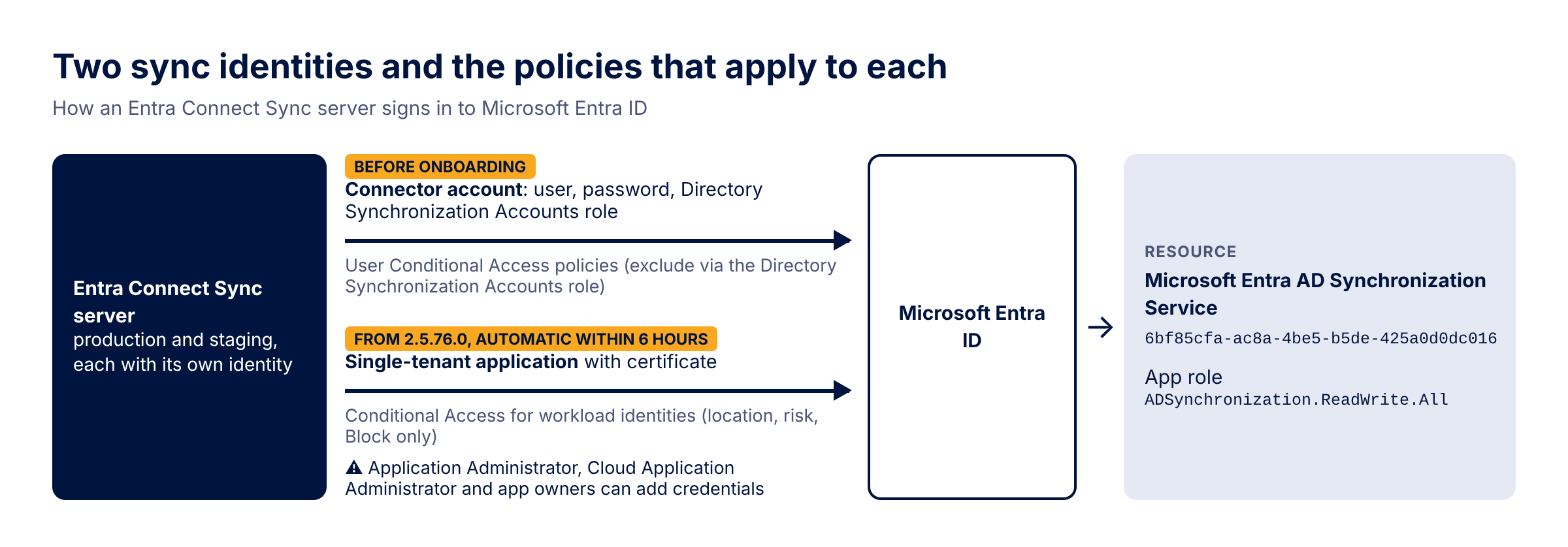
On Entra Connect Sync 2.5.76.0 and later, a server that still signs in with the old connector user account switches itself to an application with a certificate, and the resource that application requests tokens for is a Microsoft first-party service principal called Microsoft Entra AD Synchronization Service (app ID 6bf85cfa-ac8a-4be5-b5de-425a0d0dc016). That changes which Conditional Access policies apply to your sync, who can impersonate it and where its sign-ins end up. At the end of September Microsoft also turned it into a deadline: every Connect server has to run 2.5.79.0 or later by 30 September 2026. This post covers what the app is, how both sync identities relate to Conditional Access, how to monitor them and how to check per server which version and which identity it uses.
 Photo: Getty Images on Unsplash
What the Microsoft Entra AD Synchronization Service is
Application-based authentication became generally available, and the default, in version 2.5.76.0, released on 31 July with auto-upgrade from 14 August. From that version on, a server that authenticates with username and password is switched to application authentication automatically within six hours; manual onboarding works from 2.5.3.0. In the default mode Connect creates a single-tenant application in your tenant, stores its certificate in the TPM if there is one (otherwise in the software key storage provider, marked non-exportable) and rotates it itself. Version 2.5.79.0 followed on 1 September, with auto-upgrade in phases from 4 September, and its release notes are almost entirely about application authentication: a fallback when TPM signing fails, FIPS-enabled servers, and cleanup of certificates left behind by a failed setup.
So in many tenants the sync identity quietly changed this summer, from a user with a password to a service principal with a certificate. That change of identity is what most of this post is about, because it decides which of your policies apply to the sync.
Two sync identities and how Conditional Access sees them
After onboarding, the server signs in as its single-tenant service principal with the client credentials flow. User-based policies don't apply to that sign-in. Conditional Access for workload identities does: it covers single-tenant service principals registered in your tenant, which is precisely what Connect creates. It needs Workload Identities Premium licenses, the only grant is Block, and the conditions are location and service principal risk. If you have a location policy for workload identities that includes the Connect application, either directly or because it includes all service principals in the tenant (ServicePrincipalsInMyTenant in Graph), the egress IP addresses of every Connect server must be in the allowed named location. Otherwise the token request is blocked and the sync cycle fails. Because onboarding happens automatically after an upgrade, including an auto-upgrade, this can happen outside any change window. The What If tool accepts single-tenant service principals, so you can test each Connect application before it starts signing in.
Who can act as your sync
The usual application hardening levers don't map neatly onto this pair. App instance property lock, as Microsoft documents it, is something the owner of a multitenant application sets to lock credentials on its service principals in other tenants. You don't own the Microsoft resource, and Connect's application is single-tenant. "Assignment required" and the scripts that disable Microsoft service principals nobody recognises are a risk in the other direction: Microsoft describes this app as what enables synchronization, I haven't found documentation on how sync behaves with assignment required set on it, and I wouldn't want to find out in production. I'd exclude it explicitly from any such cleanup.
Once application authentication works, Microsoft recommends removing the legacy connector account with Remove-ADSyncAADServiceAccount, or, for a custom account that can't be removed, taking away its Directory Synchronization Accounts role. Connector accounts left behind by decommissioned servers are password-only identities with sync rights that your Conditional Access baseline excludes by design.
The script below lists the Microsoft resource, every principal holding an app role on it with the credential and owner situation of the matching application, and the remaining connector accounts.
Connect-MgGraph -Scopes "Application.Read.All", "RoleManagement.Read.Directory"

$syncSp = Get-MgServicePrincipal -Filter "appId eq '6bf85cfa-ac8a-4be5-b5de-425a0d0dc016'"
$syncSp | Select-Object DisplayName, Id, AccountEnabled, AppRoleAssignmentRequired

$roleNames = @{}
$syncSp.AppRoles | ForEach-Object { $roleNames[$_.Id] = $_.Value }

# Principals holding an app role on the sync resource (the Connect applications)
Get-MgServicePrincipalAppRoleAssignedTo -ServicePrincipalId $syncSp.Id -All |
    Where-Object PrincipalType -eq 'ServicePrincipal' |
    ForEach-Object {
        $sp  = Get-MgServicePrincipal -ServicePrincipalId $_.PrincipalId
        $app = Get-MgApplication -Filter "appId eq '$($sp.AppId)'"
        [pscustomobject]@{
            Principal     = $_.PrincipalDisplayName
            AppRole       = $roleNames[$_.AppRoleId]
            AssignedOn    = $_.CreatedDateTime
            AppCerts      = @($app.KeyCredentials).Count
            AppSecrets    = @($app.PasswordCredentials).Count
            SpCredentials = @($sp.KeyCredentials).Count + @($sp.PasswordCredentials).Count
            Owners        = if ($app) {
                                (Get-MgApplicationOwner -ApplicationId $app.Id |
                                    ForEach-Object { $_.AdditionalProperties.userPrincipalName }) -join '; '
                            } else { '(no app registration in this tenant)' }
        }
    } | Format-Table -AutoSize

# Legacy connector accounts (Directory Synchronization Accounts role)
$dsaRole = Get-MgDirectoryRole | Where-Object RoleTemplateId -eq 'd29b2b05-8046-44ba-8758-1e26182fcf32'
if ($dsaRole) {
    Get-MgDirectoryRoleMember -DirectoryRoleId $dsaRole.Id |
        Select-Object Id, @{ n = 'UserPrincipalName'; e = { $_.AdditionalProperties.userPrincipalName } }
}Monitoring the sync sign-ins
AADServicePrincipalSignInLogs
| where TimeGenerated > ago(14d)
| where ResourceIdentity == "6bf85cfa-ac8a-4be5-b5de-425a0d0dc016"
    or ResourceDisplayName == "Microsoft Entra AD Synchronization Service"
| summarize SignIns = count(), LastSeen = max(TimeGenerated), IPs = make_set(IPAddress)
by ServicePrincipalName, ServicePrincipalId, ServicePrincipalCredentialThumbprint, ResultType, ConditionalAccessStatuslet connectorAccounts = dynamic(["<object id 1>", "<object id 2>"]);
union SigninLogs, AADNonInteractiveUserSignInLogs
| where TimeGenerated > ago(14d)
| where UserId in (connectorAccounts)
| summarize SignIns = count(), LastSeen = max(TimeGenerated)
by UserPrincipalName, AppDisplayName, ResourceDisplayName, ResourceIdentity, IPAddress, ResultType, ConditionalAccessStatusChecking version and identity per server
(Get-Item 'C:\Program Files\Microsoft Azure AD Connect\AzureADConnect.exe').VersionInfo.ProductVersion
Get-ADSyncEntraConnectorCredential
Get-ADSyncScheduler | Select-Object StagingModeEnabled, SyncCycleEnabledBefore the auto-upgrade reaches your remaining servers, run Get-ADSyncEntraConnectorCredential on each of them, note which ones are still below 2.5.79.0, add the egress IP of every server that reports Application to the named location your workload identity policies allow, and check that your All users policies exclude the Directory Synchronization Accounts role rather than named accounts.
Update September 2026: On 29 September 2026 Microsoft moved the deadline to 7 April 2027 and raised the bar: every server needs 2.6.84.0 or later and must be configured for application-based authentication, because legacy authentication with the connector account is being retired. See the version release history. Microsoft also dropped the automatic switch described above: from 2.6.84.0 existing servers are no longer moved to application-based authentication by themselves. Servers that still report ServiceAccount need the wizard or the PowerShell steps before that date, or they stop synchronizing.
Sources
- What's new archive for Microsoft Entra (December 2024: dedicated first-party resource application for sync)
- Authenticate to Microsoft Entra ID by using application identity
- Microsoft Entra Connect: Version release history
- Microsoft Entra Connect: Accounts and permissions (Microsoft Entra Connector account)
- Conditional Access policy: Require MFA for all users (Directory Synchronization Accounts exclusion)
- Conditional Access for workload identities
- Conditional Access What If tool
- Conditional Access filters for applications
- How to configure app instance property lock
- AADServicePrincipalSignInLogs table reference
- Verify your version of the provisioning agent or Connect Sync
- Hardening update to Microsoft Entra Connect Sync
