Passkeys by default: what we're running into
Microsoft is ending its own delivery of SMS and voice authentication in Entra ID. Plenty has been written about it already and the timeline is well known by now, so I'll put that down briefly below and then move on to the part I spent the most time on: what happens when you actually carry this out in a large environment.
We're in the middle of it at the moment, and a few things worked differently than I had assumed up front.
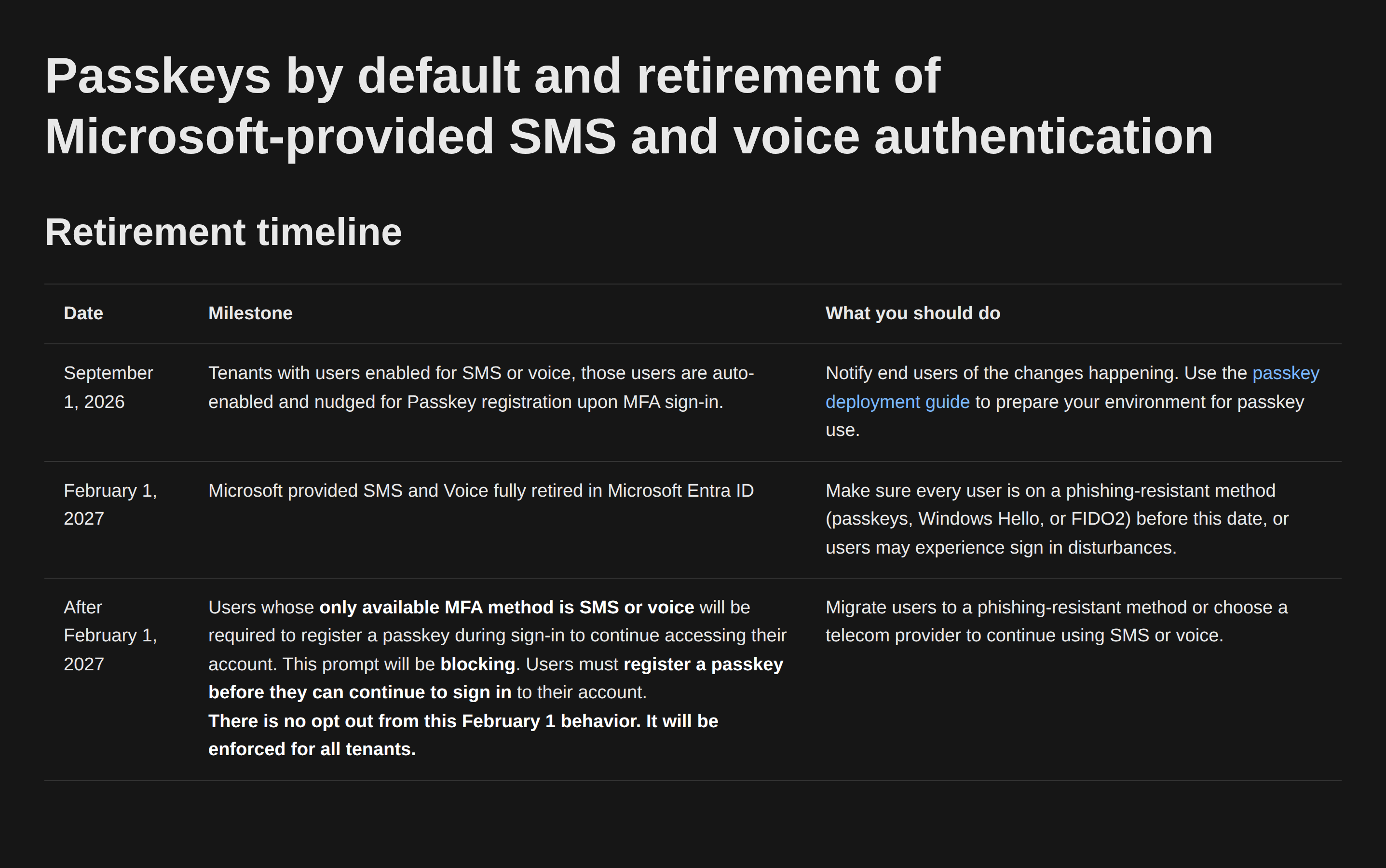
The timeline
- September 1, 2026: users enabled for SMS or voice in the Authentication Methods Policy or in legacy MFA settings are automatically enabled for passkeys. The registration campaign moves to Microsoft managed and pulls those users into scope automatically.
- September 18, 2026: Microsoft publishes which telecom providers you can use, including pricing and terms, through the Security Store.
- October 30, 2026: from this date you can actually select and configure such a provider. One per channel, so one for SMS and one for voice.
- February 1, 2027: Microsoft-provided SMS and voice are gone. If you haven't configured your own telecom provider, anyone left with only those methods gets a blocking passkey registration before they can continue. There's no opt-out for that, for any tenant.
Something else that stood out: under Microsoft managed, targeting shifts from "users with voice or SMS" to all MFA-capable users. That's broader than what this announcement is about, so don't assume only your SMS and voice population will notice anything.
Something else changes in this period that makes your rollout easier: right now a user has to register another MFA method before they can add a passkey, and SMS or voice is often exactly what gets used for that. MC1450133 removes that requirement. Synced passkeys, Entra passkeys and FIDO2 land between mid-October and mid-November 2026, Windows Hello, macOS Platform SSO and Authenticator between January and late February 2027. No action needed on your side.
For completeness: this timeline applies to the public cloud only. Other cloud environments follow later on their own schedule.
We saw few prompts with Authenticator, with passkeys that changes
We don't have the registration campaign switched on. What we did do is work out how the thing behaves, and we did that on the Authenticator campaign, since that one has been around longer. In our enterprise environment it stayed remarkably quiet there: we would see very few prompts from that campaign, for two reasons you can find straight in the documentation.
The first is in the FAQ and it's short: "The nudge doesn't trigger if the user is already signed in with SSO." In an environment running Windows Hello for Business that's more or less the default situation. You sign in in the morning with Hello, which gives you an MFA claim in your token, and you move through to your resources over SSO. You're no longer performing an interactive MFA anywhere, and that's exactly the moment the nudge hangs off.
The second is that Authenticator campaigns don't work on mobile devices at all. That takes a sizeable share of your sign-ins out of play in one go.
What I want to flag is that you can't carry that experience over one to one to September 1. The passkey registration campaign is a different story from the Authenticator campaign. Microsoft managed switches your campaign to passkeys, and that variant behaves differently on a few points. So few prompts with Authenticator does not mean things stay quiet with passkeys.
The most important difference sits on exactly that second point: passkey campaigns do work on mobile, both in the browser and in native iOS apps. Native Android apps not yet. So that's a channel that was fully closed with the Authenticator campaign and is about to open up.
Against that there's a form of suppression that didn't exist with Authenticator. My assumption was that the campaign checks whether someone has a passkey, and it doesn't: it checks whether there's a usable local passkey for your combination of operating system and browser. Windows Hello for Business suppresses the nudge on Windows in every browser, iCloud Keychain does so on Mac and iOS, a passkey in the Authenticator app only counts on iOS and Android, and according to the documentation Linux users aren't nudged at all. So the same user can see nothing on their laptop and get the prompt on their Mac. Microsoft has published the full matrix and it's worth looking at before you plan your rollout.
The SSO rule applies to both campaign types, by the way, so that part stays as it is.
And then there's a list of situations where the prompt simply doesn't appear:
What all these situations have in common: you won't be able to go by what you see happening. Few prompts and few helpdesk tickets doesn't mean you're ready here, and that makes this hard to steer.
The first is in the FAQ and it's short: "The nudge doesn't trigger if the user is already signed in with SSO." In an environment running Windows Hello for Business that's more or less the default situation. You sign in in the morning with Hello, which gives you an MFA claim in your token, and you move through to your resources over SSO. You're no longer performing an interactive MFA anywhere, and that's exactly the moment the nudge hangs off.
The second is that Authenticator campaigns don't work on mobile devices at all. That takes a sizeable share of your sign-ins out of play in one go.
What I want to flag is that you can't carry that experience over one to one to September 1. The passkey registration campaign is a different story from the Authenticator campaign. Microsoft managed switches your campaign to passkeys, and that variant behaves differently on a few points. So few prompts with Authenticator does not mean things stay quiet with passkeys.
The most important difference sits on exactly that second point: passkey campaigns do work on mobile, both in the browser and in native iOS apps. Native Android apps not yet. So that's a channel that was fully closed with the Authenticator campaign and is about to open up.
Against that there's a form of suppression that didn't exist with Authenticator. My assumption was that the campaign checks whether someone has a passkey, and it doesn't: it checks whether there's a usable local passkey for your combination of operating system and browser. Windows Hello for Business suppresses the nudge on Windows in every browser, iCloud Keychain does so on Mac and iOS, a passkey in the Authenticator app only counts on iOS and Android, and according to the documentation Linux users aren't nudged at all. So the same user can see nothing on their laptop and get the prompt on their Mac. Microsoft has published the full matrix and it's worth looking at before you plan your rollout.
The SSO rule applies to both campaign types, by the way, so that part stays as it is.
And then there's a list of situations where the prompt simply doesn't appear:
- when the user's passkey profile carries a restriction: synced only, device-bound only, attestation enforced or an AAGUID filter
- when Conditional Access on Register security information blocks the page, or when you've restricted registration to a trusted location or a compliant device
- when a terms of use screen appears during sign-in
- with Conditional Access custom controls, though that one is on its way out: they can no longer be modified from September 30, 2026 and disappear entirely in May 2027 (MC1422061)
- in out-of-the-box experiences and in browser views embedded in Windows settings
- when the Allow self-service setup toggle in your passkey configuration is off, since that's a prerequisite for the whole campaign
What all these situations have in common: you won't be able to go by what you see happening. Few prompts and few helpdesk tickets doesn't mean you're ready here, and that makes this hard to steer.
The opt-out through Graph
So the campaign isn't on in our tenant, and the temporary opt-out that became available at the start of August keeps it that way past September 1. One call, with
Policy.ReadWrite.AuthenticationMethod: PATCH https://graph.microsoft.com/beta/policies/authenticationmethodspolicy
Content-Type: application/json
{ "optOutSettings": { "passkeyDynamicMigration": true } }
That keeps your tenant out of the automatic passkey enablement and the registration campaign until February 1, 2027.
The reason we did it isn't that we want to postpone the migration, but that we didn't want anyone to get that pop-up unexpectedly (on a sign-in outside your SSO session, on a device without a usable local passkey, for example) before we'd communicated with employees. Without that call, chance decides when the first employee sees it, and you don't want that.
You don't have to come up with an end date yourself, it's fixed at February 1, 2027. What you do need to record is who owns it and when you switch it back off, because you want that moment well before the deadline rather than on it.
The reason we did it isn't that we want to postpone the migration, but that we didn't want anyone to get that pop-up unexpectedly (on a sign-in outside your SSO session, on a device without a usable local passkey, for example) before we'd communicated with employees. Without that call, chance decides when the first employee sees it, and you don't want that.
You don't have to come up with an end date yourself, it's fixed at February 1, 2027. What you do need to record is who owns it and when you switch it back off, because you want that moment well before the deadline rather than on it.
SSPR gets stuck sooner than MFA
This is the part I see covered least and the one that took us the most work. The retirement applies across Entra, so it hits self-service password reset too.
In our case SMS was already disabled for SSPR (if it's still enabled for you, turn it off regardless) and the number of methods required is set to two. What you're left with:
There is something else running in parallel: from September 7, 2026 SSPR only accepts methods that are explicitly registered (MC1325414). Phone numbers and alternate email addresses that exist only as a directory attribute no longer count. Microsoft estimates that hits around 14 percent of users. If your recovery path leans on an alternate email address from AD, check first whether that is actually a registered method.
Hardware OATH tokens are on the SSPR list, but for most organisations that isn't an answer: either you already have them lying around, or you start handing out hardware to your entire workforce. On top of that, the support for them is still labelled preview in the documentation, and you don't want that as the foundation under your recovery process.
So your second gate becomes the problem, and that's something other than swapping out a method.
As far as I can see you have four routes, and none of them is pleasant:
Where all of this points is that you have to revisit your recovery process rather than trade one method for another. If you're heading to passwordless anyway, a Temporary Access Pass with a verified identification process at the service desk is stronger than an SMS to a number you don't control. Microsoft is moving here too: MC1437671 announces that from late October 2026, users with a passwordless credential can change their password in My Sign-Ins without knowing the current one. Do note that the feature is off by default, that you have to enable it explicitly, and that it's tenant-wide with no scoping by user or group.
In our case SMS was already disabled for SSPR (if it's still enabled for you, turn it off regardless) and the number of methods required is set to two. What you're left with:
- Authenticator push and the code in that same app. That looks like two options, but it's one method and therefore one gate. Microsoft explicitly doesn't allow Authenticator plus one other method to be your only two options.
- Third-party software OATH, so a TOTP code from an app other than Authenticator. That one is a separate method, so it is a real second gate. You do end up rolling out a second app alongside Authenticator, and your recovery path stays a code someone can phish.
- Voice, which is exactly what we want gone and which disappears on February 1, 2027 unless you buy it back.
- Email OTP, in practice an external address.
- Security questions, not available for accounts holding an admin role and only manageable in the legacy SSPR policy.
There is something else running in parallel: from September 7, 2026 SSPR only accepts methods that are explicitly registered (MC1325414). Phone numbers and alternate email addresses that exist only as a directory attribute no longer count. Microsoft estimates that hits around 14 percent of users. If your recovery path leans on an alternate email address from AD, check first whether that is actually a registered method.
Hardware OATH tokens are on the SSPR list, but for most organisations that isn't an answer: either you already have them lying around, or you start handing out hardware to your entire workforce. On top of that, the support for them is still labelled preview in the documentation, and you don't want that as the foundation under your recovery process.
So your second gate becomes the problem, and that's something other than swapping out a method.
As far as I can see you have four routes, and none of them is pleasant:
- Switch SSPR off and fall back on password resets through the service desk. Always works, but you move the problem to your service desk and your identification process on the phone becomes your security control. Manageable at a few hundred users, a real cost at a few thousand.
- Go back to one gate. Quick to arrange and the least friction for users, and in practice the Authenticator app becomes that one gate. That's allowed: on the Authentication methods policy, Authenticator can be that one gate. Watch out though: that one gate isn't necessarily Authenticator. Users can use any SSPR method they have registered, so if voice or SMS is still enabled, from that moment it's enough on its own to reset a password. Turn those methods off before you move to one gate, not after. And you're deliberately lowering the bar on exactly the process someone uses to reset a password.
- Keep two gates using a method you don't actually want. Roll out email OTP, a third-party TOTP app or hardware tokens, then dismantle it again a year later. Double work, and you're putting something in place that you already know has to go.
- Accelerate to passwordless. Tackles the root of the problem, but note that passkeys and Windows Hello for Business aren't SSPR methods themselves. As long as passwords stay around for legacy applications you still need a reset and recovery path. And in a large environment you won't get this arranged before February 1 anyway.
Where all of this points is that you have to revisit your recovery process rather than trade one method for another. If you're heading to passwordless anyway, a Temporary Access Pass with a verified identification process at the service desk is stronger than an SMS to a number you don't control. Microsoft is moving here too: MC1437671 announces that from late October 2026, users with a passwordless credential can change their password in My Sign-Ins without knowing the current one. Do note that the feature is off by default, that you have to enable it explicitly, and that it's tenant-wide with no scoping by user or group.
The paid telecom provider
From September 18 you'll know which providers exist and what they cost, from October 30 you can configure one. Costs are typically per message and vary by provider and region. SMS as a primary sign-in method isn't coming back either way, not even with your own provider.
Something most write-ups leave out: the integration runs through a routing function that you deploy in your own Azure subscription. It forwards the authentication requests from Entra ID to your provider. So you aren't just buying messages per unit, you're standing up a piece of infrastructure next to it that has to be managed and monitored. Microsoft says the Azure consumption cost for it is minimal next to what the provider charges, but it's still something someone has to own. There is an evaluation mode that lets you check the routing works without your users noticing anything: they keep receiving messages over whichever channel is active while you review the results.
We mainly see this as a backstop. You're buying back a method Microsoft is dropping because it's weak. That's defensible for a defined group with a demonstrable regulatory or operational requirement, provided you actually document that requirement, but not as a tenant-wide safety net. We'd rather have voice switched off entirely anyway, so we're not going to keep paying for it.
Something most write-ups leave out: the integration runs through a routing function that you deploy in your own Azure subscription. It forwards the authentication requests from Entra ID to your provider. So you aren't just buying messages per unit, you're standing up a piece of infrastructure next to it that has to be managed and monitored. Microsoft says the Azure consumption cost for it is minimal next to what the provider charges, but it's still something someone has to own. There is an evaluation mode that lets you check the routing works without your users noticing anything: they keep receiving messages over whichever channel is active while you review the results.
We mainly see this as a backstop. You're buying back a method Microsoft is dropping because it's weak. That's defensible for a defined group with a demonstrable regulatory or operational requirement, provided you actually document that requirement, but not as a tenant-wide safety net. We'd rather have voice switched off entirely anyway, so we're not going to keep paying for it.
Don't forget your policy and documentation
This routinely gets left behind in a technical migration, while from February 1, 2027 it becomes reality for everyone still on SMS or voice.
Go through everywhere SMS and voice appear in your paperwork. Your authentication policy and MFA standard, your onboarding process and the instructions for new joiners, the work instructions at your service desk, your recovery and emergency procedures, and your ISMS documentation if you're dealing with ISO 27001 or NIS2. Plenty of those documents still literally say MFA runs over SMS, and that won't be true much longer.
Also expect your identification process at the service desk to carry more weight. Once SMS is gone and recovery leans on a TAP, the way you identify someone on the phone suddenly becomes the weakest link in the chain. That's a process decision, not a setting in Entra.
Go through everywhere SMS and voice appear in your paperwork. Your authentication policy and MFA standard, your onboarding process and the instructions for new joiners, the work instructions at your service desk, your recovery and emergency procedures, and your ISMS documentation if you're dealing with ISO 27001 or NIS2. Plenty of those documents still literally say MFA runs over SMS, and that won't be true much longer.
Also expect your identification process at the service desk to carry more weight. Once SMS is gone and recovery leans on a TAP, the way you identify someone on the phone suddenly becomes the weakest link in the chain. That's a process decision, not a setting in Entra.
Where I'd start
- Find out who is still on SMS or voice. Microsoft has a script for it:
entra-sms-voice-usage-analyzeron GitHub. Any non-zero result means you're in scope. - Scope SMS and voice down to the group that actually uses it. Pull from your sign-in logs which users genuinely authenticated with SMS or voice in the last 90 days, and enable the method for that group only instead of for everyone. That shrinks your exposure straight away, and it leaves you with a sharp list for your communication and for the question of whether you need a telecom provider at all.
- Switch on the opt-out if you're not ready to communicate yet, and record who switches it back off and when. On February 1, 2027 it expires regardless and passkey enablement kicks in for your users anyway.
- Check whether there are restrictions on your passkey profile and whether Allow self-service setup is on. With attestation or AAGUID filters this campaign won't get you anywhere and you need your own rollout path.
- Deal with SSPR before you look at MFA. That's where you get stuck fastest.
- Test the sign-in paths without an SSO session and without a local passkey, not just your standard managed Windows laptop. Note that incognito removes your SSO session but not your Windows Hello for Business, so on Windows the nudge stays suppressed. Test a combination where no usable local passkey exists: a browser sign-in on a Mac, or on a phone without a passkey. That's where your users actually get the nudge.
- Put your guest users on the list separately. They aren't nudged today, but they are in scope.
- Update your policy, procedures and service desk instructions.
- Communicate before the campaign switches on, not in response to the first helpdesk ticket.
Finally
To be clear: I think this is a good move. SMS and voice have been among the weakest methods we have for years, SIM swap and call forwarding aren't theoretical risks, and passkeys are both safer and nicer to use. Microsoft drawing a line through them is defensible.
What does occupy me is how widely this spreads out. This isn't one setting you flip: it touches your MFA methods, your SSPR setup, your recovery process, your service desk, your guest users, your policy and your communication to employees, and on a few of those points the details aren't finished on Microsoft's side either. Add to that the fact that the mechanics of the nudge make it hard to see how far along you actually are.
The hard date is February 1, 2027 and that looks far away. But everything you need to arrange before then starts with knowing who's in scope, so if you take one thing away from this: run that script this week.
What does occupy me is how widely this spreads out. This isn't one setting you flip: it touches your MFA methods, your SSPR setup, your recovery process, your service desk, your guest users, your policy and your communication to employees, and on a few of those points the details aren't finished on Microsoft's side either. Add to that the fact that the mechanics of the nudge make it hard to see how far along you actually are.
The hard date is February 1, 2027 and that looks far away. But everything you need to arrange before then starts with knowing who's in scope, so if you take one thing away from this: run that script this week.
Sources
- Passkeys by default and retirement of Microsoft-provided SMS and voice authentication
- FAQ for Microsoft-provided SMS and voice retirement
- Run a registration campaign to set up a passkey or Microsoft Authenticator
- Frequently asked questions about telephony providers in Microsoft Entra ID
- Choose a telephony provider for SMS and voice authentication
- How to migrate to the Authentication methods policy
- How it works: Microsoft Entra self-service password reset
- Security questions authentication method (retirement March 2027)
- MC1422061: retirement of Custom Controls in Conditional Access
- MC1450133: register a passkey as your first MFA method
- MC1325414: SSPR requires explicitly registered authentication methods from September 7, 2026
- MC1437671: Microsoft Entra passwordless password change in My Sign-Ins
- Jan Bakker: Passkeys by default and retirement of Microsoft-provided SMS and voice authentication