Microsoft Entra Permissions Management retires on 1 October: what to export and what to use in Azure afterwards

Microsoft Entra Permissions Management stops on 1 October 2025, and on that day Microsoft offboards every tenant automatically and deletes the collected data. If you onboarded it, even for a trial that nobody cleaned up afterwards, you have about six weeks to get the reports out and to take back the access it was given in Azure. This post covers what disappears, which exports I would make, what the product leaves behind in your subscriptions, and how to keep least privilege in Azure visible with tooling most organisations already license.
 Photo: Drazen Nesic on Unsplash
The timeline as it stands
The dates have been public since 1 April and are well covered elsewhere, so briefly. Since 1 April 2025 new Enterprise Agreement and direct customers can no longer buy Permissions Management, and since 1 May new CSP customers can't either. Existing customers keep access and support until 30 September, and on 1 October Microsoft retires the product. The offboarding guide adds the part that matters operationally: on 1 October tenants are offboarded automatically and the associated data collection is deleted. For organisations that want to keep a dedicated CIEM product, Microsoft points to Delinea's Privilege Control for Cloud Entitlements (PCCE), as stated in the March 2025 What's new entry. On the same day as the retirement announcement, the Defender for Cloud team wrote that the retirement doesn't affect the existing CIEM capabilities in Defender for Cloud.
What you lose in Azure
What Permissions Management did, and what plain Azure RBAC tooling doesn't do, is put the actions an identity is allowed to perform next to the actions it actually performed. The Permission Creep Index (PCI) condensed that gap into one score per identity, and the analytics report definitions use a 90-day window: used permissions are those used in the last 90 days, and an inactive identity is one that hasn't used any of its granted permissions in that period. Around that score sat the Remediation dashboard, which could create an Azure custom role from the activity of users, groups or apps over the last 90, 60, 30, 7 or 1 days, permissions on demand (time-limited requests with an approver), rule-based and statistical anomaly alerts, an audit trail with saved queries, and a Microsoft Entra Insights tab listing Global Administrators, other highly privileged roles and service principals.
Microsoft's own FAQ positioned the product as a complement to PIM: PIM gives just-in-time access to roles, Permissions Management gave discovery, remediation and monitoring of what those roles are used for. After 1 October you keep the first half. If you also onboarded AWS accounts or GCP projects, the loss there is bigger, because outside Defender CSPM there is little Microsoft tooling that looks at entitlements in those clouds; this post sticks to Azure.
Microsoft's own FAQ positioned the product as a complement to PIM: PIM gives just-in-time access to roles, Permissions Management gave discovery, remediation and monitoring of what those roles are used for. After 1 October you keep the first half. If you also onboarded AWS accounts or GCP projects, the loss there is bigger, because outside Defender CSPM there is little Microsoft tooling that looks at entitlements in those clouds; this post sticks to Azure.
What to export before it goes
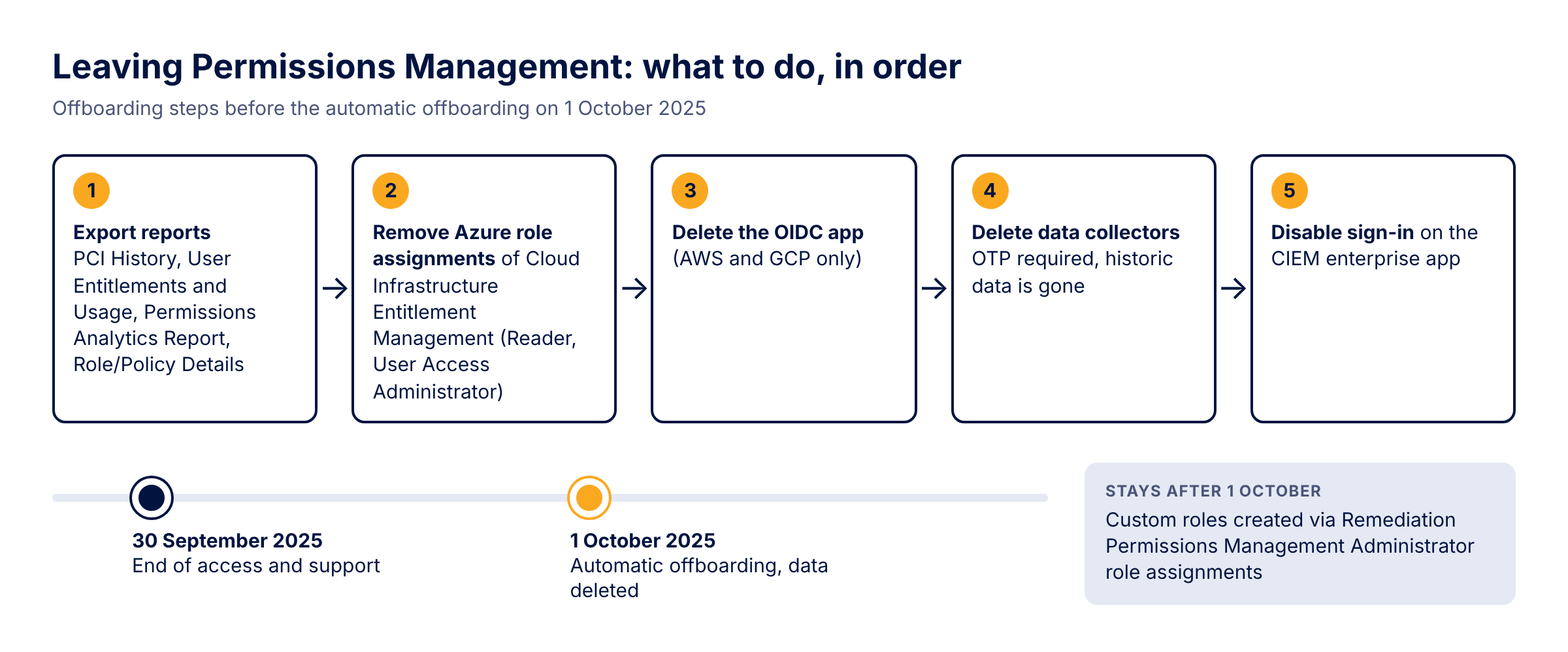
The offboarding guide asks you to write down your configuration: the authorization system IDs, who holds the Permissions Management Administrator role, the group assignments inside the Permissions Management portal, your custom reports and your alerts. That's useful if you move to PCCE, but the data itself is deleted too, so I'd export that as well. From the list of system reports, these are the ones worth keeping for Azure:
- Permissions Analytics Report (XLSX, collated over all authorization systems): super identities, inactive identities and over-provisioned active identities in one workbook.
- PCI History (CSV): the monthly PCI per authorization system, which is the only trend data you'll ever have from this product and a reasonable baseline for whatever replaces it.
- User Entitlements and Usage, detailed (CSV): the Azure role assignments per identity with the PCI and the tasks each identity actually used. This is the one I'd keep if you keep only one, because it's the evidence for right-sizing decisions you haven't made yet.
- Role/Policy Details (CSV): assigned and unassigned roles (Learn spells out the custom versus system split for AWS; check what your Azure export contains).
What Permissions Management leaves behind in Azure
Onboarding an Azure subscription meant giving the Cloud Infrastructure Entitlement Management enterprise app the Reader role on subscriptions or management groups, and with the controller enabled also User Access Administrator, so that remediation could create and assign roles. An app with User Access Administrator at management group scope that nobody owns any more is exactly the kind of standing privilege the product was bought to find. The offboarding guide gives the order: remove the permissions in Azure (and AWS and GCP), delete the OIDC app used for AWS and GCP, delete the data collectors (which asks for a one-time code by email and ends access to all historic data), and finally set "Enabled for users to sign-in" to No on the Cloud Infrastructure Entitlement Management enterprise app. Export first, then start at step one.
To see where the app holds roles, and to list the custom roles in the same pass, this works with the Az modules and Reader on the subscriptions:
# Az.Accounts and Az.Resources
Connect-AzAccount
$tenantId = (Get-AzContext).Tenant.Id
$ciem = Get-AzADServicePrincipal -DisplayName 'Cloud Infrastructure Entitlement Management'

$assignments = @()
$customRoles = @()
foreach ($sub in Get-AzSubscription -TenantId $tenantId) {
    Set-AzContext -Subscription $sub.Id | Out-Null
    $assignments += Get-AzRoleAssignment -ObjectId $ciem.Id
    $customRoles += Get-AzRoleDefinition -Custom
}

# Assignments inherited from a management group show up once per subscription
$assignments | Sort-Object RoleAssignmentId -Unique |
    Select-Object RoleDefinitionName, Scope | Format-Table -AutoSize

$customRoles | Sort-Object Id -Unique |
    Select-Object Name, Id, AssignableScopes | Format-Table -AutoSize
The custom roles matter because roles created from the Remediation dashboard are ordinary Azure custom roles. They stay after 1 October, assigned to whoever they were assigned to, and from then on nothing explains where they came from. Compare the list with the Role/Policy Details export and give each one an owner or remove it. Two smaller items: check that no permissions-on-demand grant is still running when you offboard (I wouldn't count on a service that no longer exists to remove a time-limited assignment), and remove the Permissions Management Administrator role assignments in Entra once offboarding is done.
Keeping least privilege visible with what you already have
PIM for Azure resources is the obvious base: Owner, User Access Administrator and Contributor on production scopes as eligible instead of active assignments. The PIM alerts for Azure roles cover too many owners, too many permanent owners, duplicate roles and roles assigned outside PIM. That last alert only fires for role assignments on subscriptions, not on management groups, resource groups or resources, so an assignment at management group scope, like the one the CIEM app may hold, never triggers it.
Access reviews of Azure resource roles in PIM give you the recurring decision, with auto-apply and an option to review only users inactive on tenant level for up to 730 days. Be aware what the recommendations are based on: whether the user signed in during the last 30 days, interactively or not. That tells a reviewer whether the account is alive, not whether it used its Owner role, so a developer who signs in every day but never touches the subscription gets an "approve" recommendation. Reviewing service principals requires Microsoft Entra Workload ID Premium on top of Entra ID P2 or ID Governance.
If you license Defender CSPM, the closest native replacement for what Permissions Management did in Azure is the CIEM capability in Defender for Cloud, enabled per subscription with the Permissions Management (CIEM) toggle in the Defender CSPM plan settings. It produces the recommendations "Azure overprovisioned identities should have only the necessary permissions" and "Permissions of inactive identities in your Azure subscription should be revoked"; the latter flags identities that haven't performed any action on any resource in the subscription in the past 45 days. Cloud Security Explorer then answers who can reach which resource. The window is shorter than the 90 days you're used to, so expect different numbers than in your exports.
Without Defender CSPM you can still approximate "granted versus used" for the control plane, if the activity log goes to a Log Analytics workspace:
Access reviews of Azure resource roles in PIM give you the recurring decision, with auto-apply and an option to review only users inactive on tenant level for up to 730 days. Be aware what the recommendations are based on: whether the user signed in during the last 30 days, interactively or not. That tells a reviewer whether the account is alive, not whether it used its Owner role, so a developer who signs in every day but never touches the subscription gets an "approve" recommendation. Reviewing service principals requires Microsoft Entra Workload ID Premium on top of Entra ID P2 or ID Governance.
If you license Defender CSPM, the closest native replacement for what Permissions Management did in Azure is the CIEM capability in Defender for Cloud, enabled per subscription with the Permissions Management (CIEM) toggle in the Defender CSPM plan settings. It produces the recommendations "Azure overprovisioned identities should have only the necessary permissions" and "Permissions of inactive identities in your Azure subscription should be revoked"; the latter flags identities that haven't performed any action on any resource in the subscription in the past 45 days. Cloud Security Explorer then answers who can reach which resource. The window is shorter than the 90 days you're used to, so expect different numbers than in your exports.
Without Defender CSPM you can still approximate "granted versus used" for the control plane, if the activity log goes to a Log Analytics workspace:
AzureActivity
| where TimeGenerated > ago(90d)
| where CategoryValue =~ "Administrative"
| extend Caller = tolower(Caller)
| summarize LastActivity = max(TimeGenerated),
            Operations = make_set(OperationNameValue, 100)
            by Caller, SubscriptionId
| order by LastActivity asc
Put the result next to the role assignments from the script above: an identity with Owner or Contributor that doesn't appear here at all is a candidate for removal or for an eligible assignment. Values in AzureActivity don't always have the same case, hence the tolower(). The activity log doesn't typically capture read operations and doesn't capture data plane operations at all, and Azure keeps it for 90 days unless you route it somewhere with a diagnostic setting, so treat an absence as a question for the owner, not as proof.
Before the end of August, generate the PCI History and the detailed User Entitlements and Usage report for each Azure authorization system, then run the script above and remove the User Access Administrator assignment of Cloud Infrastructure Entitlement Management as soon as your exports are in.
Update September 2025: On 29 September Microsoft updated the retirement announcement: the retirement moves to 1 November 2025, the extension is final, and customers are offboarded automatically on 1 November. The export and cleanup steps don't change; you get one more month for them.
Update December 2025: On 2 December Defender for Cloud announced an upcoming change to its CIEM recommendation logic as part of the Permissions Management deprecation: inactivity is judged on unused role assignments instead of sign-in activity, the lookback window goes from 45 to 90 days, identities created in the last 90 days are no longer flagged, and the Permission Creep Index disappears from Defender for Cloud. Expect the inactive identity numbers to shift; see What's new in Defender for Cloud.
Before the end of August, generate the PCI History and the detailed User Entitlements and Usage report for each Azure authorization system, then run the script above and remove the User Access Administrator assignment of Cloud Infrastructure Entitlement Management as soon as your exports are in.
Update September 2025: On 29 September Microsoft updated the retirement announcement: the retirement moves to 1 November 2025, the extension is final, and customers are offboarded automatically on 1 November. The export and cleanup steps don't change; you get one more month for them.
Update December 2025: On 2 December Defender for Cloud announced an upcoming change to its CIEM recommendation logic as part of the Permissions Management deprecation: inactivity is judged on unused role assignments instead of sign-in activity, the lookback window goes from 45 to 90 days, identities created in the last 90 days are no longer flagged, and the Permission Creep Index disappears from Defender for Cloud. Expect the inactive identity numbers to shift; see What's new in Defender for Cloud.
Sources
- Important change announcement: Microsoft Entra Permissions Management end of sale and retirement (Microsoft Entra blog)
- What's new in Microsoft Entra: Permissions Management end of sale and retirement (March 2025)
- How to offboard and transition off of Microsoft Entra Permissions Management
- Permissions Management: list and description of system reports
- Permissions Management: view and download the Permissions analytics report
- Permissions Management: onboard a Microsoft Azure subscription
- Permissions Management: enable or disable the controller after onboarding
- Permissions Management FAQ
- The future of CIEM in Microsoft Defender for Cloud (Defender for Cloud blog)
- Cloud infrastructure entitlement management (CIEM) in Defender for Cloud
- Enable CIEM in Defender for Cloud
- Configure security alerts for Azure roles in Privileged Identity Management
- Create an access review of Azure resource and Microsoft Entra roles in PIM
- Get-AzRoleAssignment
- Activity log in Azure Monitor
- AzureActivity table reference
- What's new in Defender for Cloud
