Finding ADAL apps after the recommendations API retires

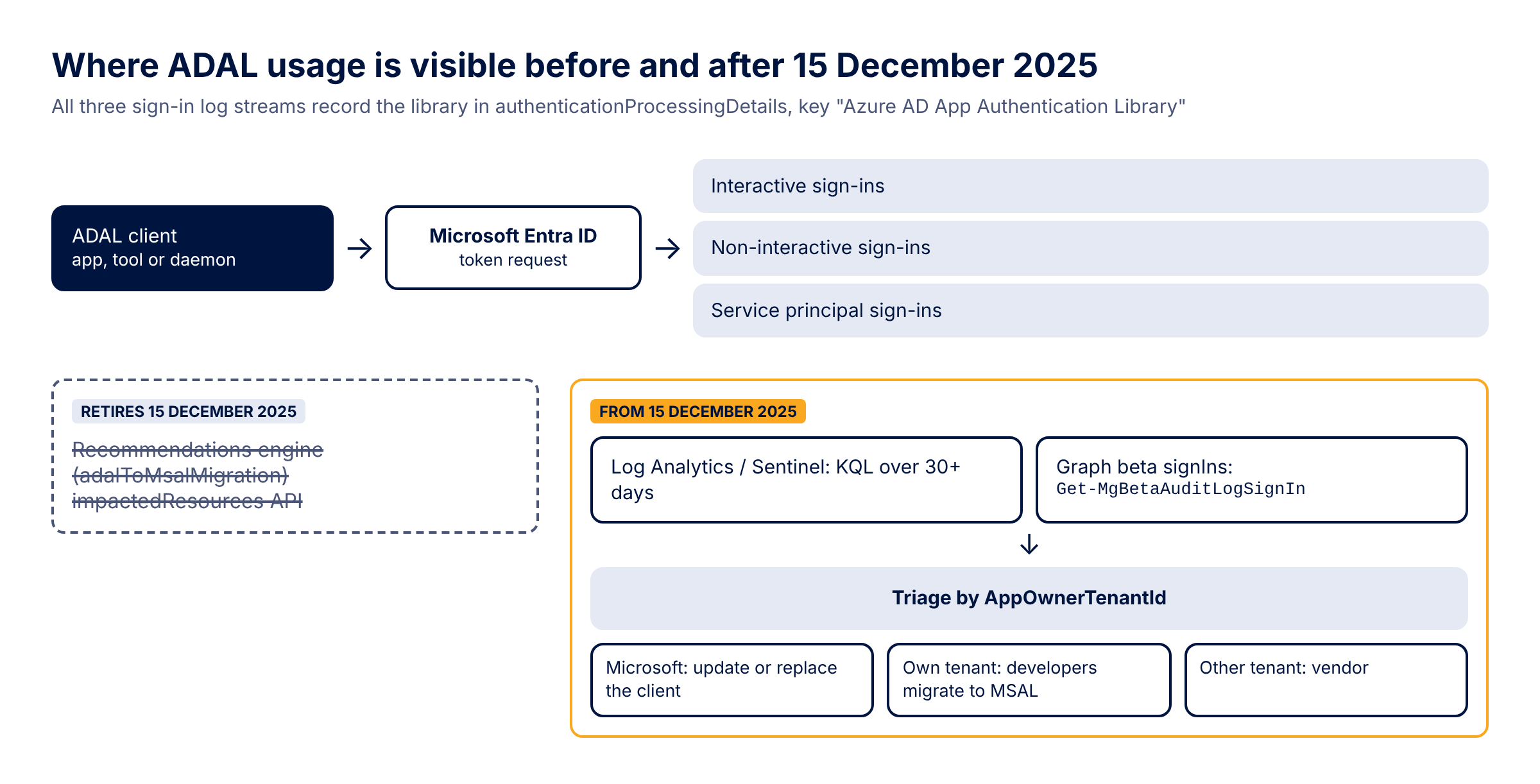
On 15 December 2025 Microsoft retires the ADAL to MSAL Recommendations API, the Graph endpoint behind the "Migrate from ADAL to MSAL" recommendation in Entra ID. ADAL has been out of support since June 2023 and apps that still use it keep working, so in a lot of tenants that recommendation was the only thing still pointing at them. This post covers what goes away, how to build the same list from the sign-in logs with KQL or Graph PowerShell, and how I sort the results into work for your own developers, for a vendor or for whoever manages the client.
 Photo: Curated Lifestyle on Unsplash
What retires on 15 December
The announcement is a September 2025 entry in What's new for Microsoft Entra. Its heading reads "Microsoft Authentication Library to MSAL", which is a typo for ADAL, so search the page for the date rather than the name. The entry says the ADAL to MSAL Recommendations API retires on 15 December 2025, that you don't need to do anything to disable it, and that you can keep monitoring library usage by querying the sign-in logs through Microsoft Graph, where the data sits in authenticationProcessingDetails under the key "Azure AD App Authentication Library".
In Graph the recommendation is called adalToMsalMigration. Anything you built on
How the recommendation worked is useful to know, because that's the logic you'll be rebuilding. It checked daily for ADAL token requests over the past 30 days and labelled every app that requested a token through ADAL as an ADAL application, including apps that use ADAL and MSAL side by side. An app was marked completed after 30 days without an ADAL request and went back to active as soon as a new one came in.
In Graph the recommendation is called adalToMsalMigration. Anything you built on
GET https://graph.microsoft.com/beta/directory/recommendations/{tenantId}_adalToMsalMigration/impactedResources, such as a dashboard or a job that opens tickets for app owners, loses its source. The entry only talks about the API. It doesn't say what happens to the recommendation in the admin center, and the recommendation's own Learn page doesn't mention the retirement at all, so I wouldn't count on the portal view staying around either.How the recommendation worked is useful to know, because that's the logic you'll be rebuilding. It checked daily for ADAL token requests over the past 30 days and labelled every app that requested a token through ADAL as an ADAL application, including apps that use ADAL and MSAL side by side. An app was marked completed after 30 days without an ADAL request and went back to active as soon as a new one came in.
Why ADAL apps still deserve attention
The MSAL migration page is clear about the support status: all Microsoft support and development for ADAL, including security fixes, ended on 30 June 2023, and no features have been added since June 2020. The same page says existing ADAL apps continue to work, which is exactly why they're still around. Nothing breaks, so nobody files a ticket.
The more practical problem is in the comparison table further down that page. ADAL has no support for continuous access evaluation, token protection or the authentication broker that device-based Conditional Access relies on. Those are the controls most identity teams are rolling out now, and an ADAL client in front of a resource is what typically ends up as a permanent exclusion in the policy that was meant to enforce them. So the identity team needs that list, with an owner per app, for its own Conditional Access plans, whatever the developers end up doing with it.
The more practical problem is in the comparison table further down that page. ADAL has no support for continuous access evaluation, token protection or the authentication broker that device-based Conditional Access relies on. Those are the controls most identity teams are rolling out now, and an ADAL client in front of a resource is what typically ends up as a permanent exclusion in the policy that was meant to enforce them. So the identity team needs that list, with an owner per app, for its own Conditional Access plans, whatever the developers end up doing with it.
Where the library shows up in the sign-in logs
Every sign-in record has authenticationProcessingDetails, a collection of key/value pairs. When Entra ID can tell which library requested the token, one of those pairs has the key "Azure AD App Authentication Library" and a value that names the library family, the library and its version. Microsoft's own Sign-ins workbook filters on values containing "ADAL" and takes the fourth and fifth word of the value as the ADAL version, which tells you roughly what the format looks like.
A few things the What's new entry doesn't mention. The property only exists on the beta signIn resource; the v1.0 resource doesn't have it, so in PowerShell you need Get-MgBetaAuditLogSignIn from Microsoft.Graph.Beta.Reports rather than Get-MgAuditLogSignIn. List signIns also returns only interactive sign-ins unless you filter on signInEventTypes. ADAL clients mostly refresh tokens silently and daemons use client credentials, so most of what you're looking for is in the non-interactive and service principal sign-ins. The workbook covers all three, and as far as I can tell the recommendation did too.
Both routes below need Entra ID P1 or P2: Graph requires it to read sign-in logs, and so does the diagnostic setting that sends them to Log Analytics. Entra keeps sign-ins for 30 days on P1 and P2 according to the data retention reference, which matches the recommendation's window. An app that only runs at month or quarter end needs a longer history than that, which is one more reason to have the logs in a workspace.
A few things the What's new entry doesn't mention. The property only exists on the beta signIn resource; the v1.0 resource doesn't have it, so in PowerShell you need Get-MgBetaAuditLogSignIn from Microsoft.Graph.Beta.Reports rather than Get-MgAuditLogSignIn. List signIns also returns only interactive sign-ins unless you filter on signInEventTypes. ADAL clients mostly refresh tokens silently and daemons use client credentials, so most of what you're looking for is in the non-interactive and service principal sign-ins. The workbook covers all three, and as far as I can tell the recommendation did too.
Both routes below need Entra ID P1 or P2: Graph requires it to read sign-in logs, and so does the diagnostic setting that sends them to Log Analytics. Entra keeps sign-ins for 30 days on P1 and P2 according to the data retention reference, which matches the recommendation's window. An app that only runs at month or quarter end needs a longer history than that, which is one more reason to have the logs in a workspace.
KQL for Log Analytics or Sentinel
If your sign-in logs already go to a Log Analytics workspace (all three sign-in categories, not only SignInLogs), this gives you one row per app with the library versions seen, the sign-in types and which tenant owns the app. AuthenticationProcessingDetails is a string column in all three tables, hence the parse_json.
let lookback = 30d;
let myTenantId = "<your tenant ID>";
union
    (SigninLogs
        | where TimeGenerated > ago(lookback)
        | extend AppName = AppDisplayName, SignInType = "interactive"),
    (AADNonInteractiveUserSignInLogs
        | where TimeGenerated > ago(lookback)
        | extend AppName = AppDisplayName, SignInType = "nonInteractive"),
    (AADServicePrincipalSignInLogs
        | where TimeGenerated > ago(lookback)
        | extend AppName = ServicePrincipalName, SignInType = "servicePrincipal")
| mv-expand Detail = parse_json(AuthenticationProcessingDetails)
| where tostring(Detail.key) == "Azure AD App Authentication Library"
| extend Library = tostring(Detail.value)
| where Library has "ADAL"
| summarize SignIns = count(), Users = dcountif(UserPrincipalName, isnotempty(UserPrincipalName)), LastSeen = max(TimeGenerated),
            SignInTypes = make_set(SignInType), Libraries = make_set(Library, 10)
    by AppId, AppName, AppOwnerTenantId
| extend Owner = case(
    AppOwnerTenantId in ("f8cdef31-a31e-4b4a-93e4-5f571e91255a", "72f988bf-86f1-41af-91ab-2d7cd011db47"), "Microsoft",
    AppOwnerTenantId == myTenantId, "Own tenant",
    isempty(AppOwnerTenantId), "Unknown",
    "Other tenant")
| order by SignIns desc
The Owner column relies on AppOwnerTenantId. f8cdef31-a31e-4b4a-93e4-5f571e91255a is the Microsoft Services tenant and 72f988bf-86f1-41af-91ab-2d7cd011db47 is Microsoft's own tenant, both listed in Verify first-party Microsoft applications in sign-in reports.
Graph PowerShell without Log Analytics
Without a workspace the same data comes from Graph. This pulls seven days per sign-in type and groups the ADAL sign-ins per app. It needs AuditLog.Read.All and a role that can read sign-in logs, such as Reports Reader or Global Reader.
Connect-MgGraph -Scopes "AuditLog.Read.All"
# authenticationProcessingDetails is only on the beta signIn resource (Microsoft.Graph.Beta.Reports)
$since = (Get-Date).ToUniversalTime().AddDays(-7).ToString("yyyy-MM-ddTHH:mm:ssZ", [cultureinfo]::InvariantCulture)

$adal = foreach ($type in 'interactiveUser', 'nonInteractiveUser', 'servicePrincipal') {
    $filter = "createdDateTime ge $since and signInEventTypes/any(t: t eq '$type')"
    Get-MgBetaAuditLogSignIn -Filter $filter -All | ForEach-Object {
        $lib = ($_.AuthenticationProcessingDetails |
            Where-Object Key -eq 'Azure AD App Authentication Library').Value
        if ($lib -match 'ADAL') {
            [pscustomobject]@{
                AppId            = $_.AppId
                AppName          = if ($_.AppDisplayName) { $_.AppDisplayName } else { $_.ServicePrincipalName }
                AppOwnerTenantId = $_.AppOwnerTenantId
                Library          = $lib
                SignInType       = $type
                User             = $_.UserPrincipalName
            }
        }
    }
}

$adal | Group-Object AppId | ForEach-Object {
    [pscustomobject]@{
        AppId            = $_.Name
        AppName          = $_.Group[0].AppName
        AppOwnerTenantId = $_.Group[0].AppOwnerTenantId
        SignIns          = $_.Count
        Users            = @($_.Group.User | Where-Object { $_ } | Sort-Object -Unique).Count
        SignInTypes      = ($_.Group.SignInType | Sort-Object -Unique) -join ', '
        Libraries        = ($_.Group.Library | Sort-Object -Unique) -join '; '
    }
} | Sort-Object SignIns -Descending | Format-Table -AutoSize
Be realistic about volume. In a large tenant a week of non-interactive sign-ins is a lot of pages, so start with one day, look at the run time and extend from there. For anything you want to repeat, a workspace is the better place.
While the API still answers, I'd also export what the recommendation knows today, so you have something to check your own results against. The ID format comes from the recommendation's Learn page, and List impactedResources needs DirectoryRecommendations.Read.All.
While the API still answers, I'd also export what the recommendation knows today, so you have something to check your own results against. The ID format comes from the recommendation's Learn page, and List impactedResources needs DirectoryRecommendations.Read.All.
Connect-MgGraph -Scopes "DirectoryRecommendations.Read.All"
$tenantId = (Get-MgContext).TenantId

Get-MgBetaDirectoryRecommendationImpactedResource -RecommendationId "${tenantId}_adalToMsalMigration" -All |
    Select-Object DisplayName, SubjectId, Status, AddedDateTime,
        @{ n = 'Library'; e = { ($_.AdditionalDetails | Where-Object Key -eq 'Library').Value } } |
    Export-Csv -Path .\adal-recommendation-export.csv -NoTypeInformation
Sorting the results by owner
Which tenant owns the app decides who has to act.
If Microsoft owns it, there's no code for you to migrate. The ADAL code is in a Microsoft client or tool, and the fix is updating or replacing that client. The user and sign-in type columns tell you who still runs the old version, and the device details in the underlying sign-ins tell you on what.
If the app is registered in your own tenant, it's an internal development job. The owners are on the app registration under Owners, and the library value tells the developers which migration guide applies (ADAL.NET, ADAL.js, Java and so on, all linked from the MSAL migration page). If there's no current owner, the users column and the IP addresses in the sign-ins are the best lead to whoever still runs it.
If the app belongs to another tenant, it's a vendor product. You can't fix it yourself, but you can ask the vendor for an MSAL-based version and a date, write the answer down, and decide what happens if there isn't one, for example limiting who can use it by setting assignment required on the enterprise app while you plan a replacement.
Apps with an empty AppOwnerTenantId I'd look up by AppId under Enterprise applications before putting them in any of these groups.
If Microsoft owns it, there's no code for you to migrate. The ADAL code is in a Microsoft client or tool, and the fix is updating or replacing that client. The user and sign-in type columns tell you who still runs the old version, and the device details in the underlying sign-ins tell you on what.
If the app is registered in your own tenant, it's an internal development job. The owners are on the app registration under Owners, and the library value tells the developers which migration guide applies (ADAL.NET, ADAL.js, Java and so on, all linked from the MSAL migration page). If there's no current owner, the users column and the IP addresses in the sign-ins are the best lead to whoever still runs it.
If the app belongs to another tenant, it's a vendor product. You can't fix it yourself, but you can ask the vendor for an MSAL-based version and a date, write the answer down, and decide what happens if there isn't one, for example limiting who can use it by setting assignment required on the enterprise app while you plan a replacement.
Apps with an empty AppOwnerTenantId I'd look up by AppId under Enterprise applications before putting them in any of these groups.
Keeping watch after the API is gone
The recommendation gave you two things for free: a rolling 30-day window and a signal when an app that had gone quiet started using ADAL again. You can get both back by saving the KQL as a log search alert that runs once a day over the last 30 days, with a filter that excludes the AppIds you've already triaged, so it only fires for something new. Without a workspace, a monthly run of the PowerShell version compared against the previous export does the same job with more manual work.
Before the 15th, export the impactedResources list, run the query or the script over the same period, and give every app that appears in either result an owner and a target date.
Before the 15th, export the impactedResources list, run the query or the script over the same period, and give every app that appears in either result an owner and a target date.
Sources
- What's new for Microsoft Entra (September 2025: retirement of the ADAL to MSAL Recommendations API)
- Microsoft Entra recommendation: Migrate from ADAL to MSAL
- Get a complete list of apps using ADAL in your tenant (Sign-ins workbook)
- Sign-ins workbook source on GitHub (ADAL queries)
- Migrate applications to the Microsoft Authentication Library (MSAL)
- Microsoft Graph beta: signIn resource type (authenticationProcessingDetails)
- Microsoft Graph beta: List signIns (signInEventTypes filter, permissions)
- Get-MgBetaAuditLogSignIn
- Microsoft Graph beta: List impactedResources
- Azure Monitor table reference: SigninLogs
- Integrate Microsoft Entra logs with Azure Monitor logs (P1 or P2 required)
- Microsoft Entra data retention
- Verify first-party Microsoft applications in sign-in reports
- Microsoft Entra blog: Migrate ADAL apps to MSAL with enhanced insights (July 2024)
