Password change after secure sign-in: what Message Center and Learn each say

Microsoft Entra now lets users set a new cloud password from Security info without knowing their current one, as long as they signed in with a strong method first. The feature is off by default and is rolling out until the end of November. The Message Center post and the Learn documentation describe it differently on a few points that matter, most of all on Windows Hello for Business. We're going to test it thoroughly in the coming weeks, and once we have, I'll add the results to this post as an update.
 Photo: Alexander Mils on Unsplash
What the feature does
The use case is familiar. A user signs in with a passkey every day, never types a password, and then a legacy application that only does passwords asks for one. The password is long gone from memory, so the options were SSPR or the service desk. With Allow password change after secure sign-in enabled, that user goes to Security info (or straight to
According to the combined registration page, part of this already existed: a user who signs in to Security info with a password and an MFA method can change their password without entering the existing one. That's not what we saw. In a first quick test in our own tenant (InPrivate window, password plus Authenticator push, straight to the change page) the dialog still asked for the current password. So either that sentence is out of date or there's a condition it doesn't mention. For the passwordless user it makes no difference: someone who signed in with a passkey hasn't proven they know the password, so until now they always had to enter it. That's the gap this feature closes.
According to the Learn page (a new tab on "How it works: Microsoft Entra self-service password reset"), this is separate from SSPR: users don't need to be registered for SSPR and the number of methods required in your SSPR policy doesn't apply. The setting lives on the Password method in the Authentication methods policy, enabling it takes at least Authentication Policy Administrator, and it's tenant-wide with no way to target or exclude users or groups. Users need Entra ID P1 or P2. In a hybrid tenant with password writeback the new password goes to AD as well; for identities that only exist on-premises, My Sign-Ins can't do anything.
https://mysignins.microsoft.com/security-info/password/change), signs in with a supported method, selects Change next to Password and enters a new password twice. The current password isn't asked for.According to the combined registration page, part of this already existed: a user who signs in to Security info with a password and an MFA method can change their password without entering the existing one. That's not what we saw. In a first quick test in our own tenant (InPrivate window, password plus Authenticator push, straight to the change page) the dialog still asked for the current password. So either that sentence is out of date or there's a condition it doesn't mention. For the passwordless user it makes no difference: someone who signed in with a passkey hasn't proven they know the password, so until now they always had to enter it. That's the gap this feature closes.
According to the Learn page (a new tab on "How it works: Microsoft Entra self-service password reset"), this is separate from SSPR: users don't need to be registered for SSPR and the number of methods required in your SSPR policy doesn't apply. The setting lives on the Password method in the Authentication methods policy, enabling it takes at least Authentication Policy Administrator, and it's tenant-wide with no way to target or exclude users or groups. Users need Entra ID P1 or P2. In a hybrid tenant with password writeback the new password goes to AD as well; for identities that only exist on-premises, My Sign-Ins can't do anything.
Where Message Center and Learn differ
MC1437671 was first published on 23 July and last updated on 13 October. The feature changed name twice along the way, from "Passwordless password change in My Sign-Ins" via "Authenticated password change in My Sign-Ins" to the current name. The Learn tab went live on 29 October. Put next to each other, the two sources don't line up:
- Sign-in methods. Message Center names a passkey, a FIDO2 security key and Windows Hello for Business. Learn names Microsoft Entra certificate-based authentication, a passkey (FIDO2) and Microsoft Authenticator passwordless phone sign-in. CBA and Authenticator phone sign-in are only in Learn, Windows Hello for Business is only in Message Center.
- Registered or available. Message Center talks about users who have a registered method. Learn says that if a supported method isn't available to the user, they need another way to change or reset. That makes sense once CBA is on the list, because a certificate isn't something you register in Security info.
- Clouds. Message Center has the rollout for Worldwide and GCC. Learn says all clouds, from late October to the end of November.
- Licensing. Learn requires P1 or P2 for the user. The Message Center post doesn't mention licensing.
- How to enable it. Learn gives a portal path (Entra ID > Authentication methods > Policies > Password > Configure). Jan Bakker (30 October) and Tony Redmond (3 November) both found the setting wasn't in the admin center yet and enabled it through Graph beta. Check what your tenant shows; Graph works either way.
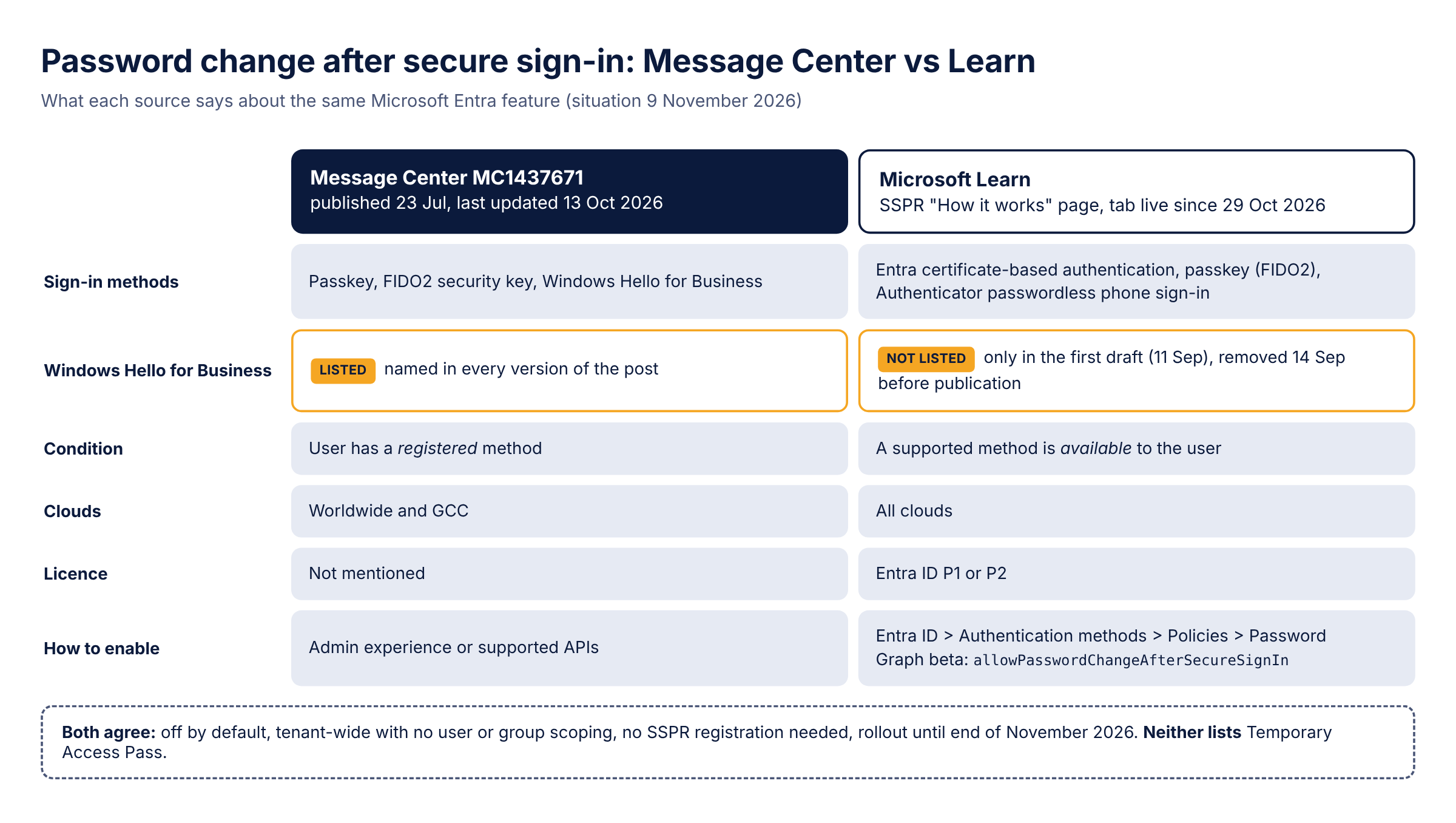
Temporary Access Pass isn't on either list, and the combined registration page is explicit about it: TAP isn't supported for password change unless the user knows their existing password.
The Windows Hello for Business question
This is the difference that matters most in practice, because on most managed Windows estates I see, WHfB is how people sign in. If you track Learn changes through a diff service such as Entradiff, you saw the new tab appear on 29 October with passkey (FIDO2) or Windows Hello for Business as the sign-in methods, followed on the same day by a version with CBA, passkey and Authenticator. That looks like Microsoft adding WHfB and pulling it within hours, but the Git history of MicrosoftDocs/entra-docs tells a different story. The first draft of the tab was written on 11 September and did say users authenticate with "a registered passkey (FIDO2) or Windows Hello for Business credential". Three days later, on 14 September, a commit titled "Clarify passwordless password change methods" replaced that with the current three methods. Everything up to the rollout note of 23 October was then synced into the public repo in one merge on 29 October, which is why diff tools show both versions on the same day. (The first draft also said the feature didn't support password writeback; that was corrected in the same series on 14 September.)
So as far as I can tell, the published Learn page never listed WHfB. The documentation team took it out almost a month before the October Message Center updates, which still name it. Which of the two describes the actual behaviour, I don't know. WHfB is its own method in Entra, separate from Passkey (FIDO2), even though both are key-based and Windows Hello can also act as a FIDO2 authenticator, and in my experience the sign-in logs show it as Windows Hello for Business. Until we've tested it, I wouldn't tell users on WHfB that this works for them.
So as far as I can tell, the published Learn page never listed WHfB. The documentation team took it out almost a month before the October Message Center updates, which still name it. Which of the two describes the actual behaviour, I don't know. WHfB is its own method in Entra, separate from Passkey (FIDO2), even though both are key-based and Windows Hello can also act as a FIDO2 authenticator, and in my experience the sign-in logs show it as Windows Hello for Business. Until we've tested it, I wouldn't tell users on WHfB that this works for them.
Turning it on
If the setting isn't in your admin center yet, this does the same through Graph beta. It needs the
Policy.ReadWrite.AuthenticationMethod scope and a role such as Authentication Policy Administrator: Connect-MgGraph -Scopes "Policy.ReadWrite.AuthenticationMethod"
$uri = "https://graph.microsoft.com/beta/policies/authenticationMethodsPolicy/authenticationMethodConfigurations/Password"
$body = @{
"@odata.type" = "#microsoft.graph.passwordAuthenticationMethodConfiguration"
allowPasswordChangeAfterSecureSignIn = $true
}
Invoke-MgGraphRequest -Method PATCH -Uri $uri -Body ($body | ConvertTo-Json) -ContentType "application/json"
# Read it back; this only needs the Microsoft.Graph.Authentication module
Invoke-MgGraphRequest -Method GET -Uri $uri | ConvertTo-Json
I read the setting back with
Invoke-MgGraphRequest on purpose. The Beta SDK cmdlet Get-MgBetaPolicyAuthenticationMethodPolicyAuthenticationMethodConfiguration refuses to load when your Microsoft.Graph.Authentication module has a different version than the Beta module, and even when it does work, the property only shows up under AdditionalProperties, because the SDK doesn't have it as a typed property yet. In our own tenant, before turning it on, the object looked like this: {
"@odata.type": "#microsoft.graph.passwordAuthenticationMethodConfiguration",
"id": "Password",
"state": "enabled",
"allowPasswordChangeAfterSecureSignIn": false
}
There are no
Two things from Tony Redmond's test: the policy change took effect almost immediately for him, and enabling the setting does nothing until the rollout has reached your tenant. He also ran into one glitch. After he let the change password dialog time out, Teams misbehaved when switching back to his home tenant until he reset the password and signed out and back in to Teams. His advice is to finish the flow once you start it.
includeTargets or excludeTargets, which the documented methods in the policy do have. So the API agrees with the documentation: there's no way to scope this to a group. I'd leave state alone. What setting it to disabled does isn't documented anywhere, and that's not something you want to find out in production.Two things from Tony Redmond's test: the policy change took effect almost immediately for him, and enabling the setting does nothing until the rollout has reached your tenant. He also ran into one glitch. After he let the change password dialog time out, Teams misbehaved when switching back to his home tenant until he reset the password and signed out and back in to Teams. His advice is to finish the flow once you start it.
How this connects to the SMS and voice retirement
On its own this is a convenience feature. Next to the rest of what Microsoft is doing to authentication this winter, it fills a gap. Since 1 September, users enabled for SMS or voice are automatically enabled for passkeys and the registration campaign nudges them. On 1 February 2027 Microsoft-provided SMS and voice retire (1 July 2027 for Global Administrators and external users), the temporary opt-out from automatic passkey enablement stops applying, and users whose only MFA method was SMS or voice have to register a passkey before they can continue signing in. Large numbers of users are about to end up passkey-first whether their organisation planned it or not, and those are exactly the users who stop typing their password and forget it.
That collides with SSPR, because passkeys and WHfB can't be used for SSPR. I went through the remaining SSPR methods in the passkeys post: Authenticator and OATH tokens count as a single method, SMS and voice disappear on 1 February unless you buy a telephony provider, and security questions retire in March 2027. Add SSPR only accepting registered methods (from 9 November according to Message Center, from February 2027 according to Learn since 5 November) and the group of users who can actually complete SSPR keeps shrinking.
That collides with SSPR, because passkeys and WHfB can't be used for SSPR. I went through the remaining SSPR methods in the passkeys post: Authenticator and OATH tokens count as a single method, SMS and voice disappear on 1 February unless you buy a telephony provider, and security questions retire in March 2027. Add SSPR only accepting registered methods (from 9 November according to Message Center, from February 2027 according to Learn since 5 November) and the group of users who can actually complete SSPR keeps shrinking.
What's left for SSPR
This feature is the logical next step. The everyday case (I know who I am, I can sign in with my passkey, I just don't know the password for that one old application) moves out of SSPR entirely. A strong sign-in becomes the proof that you may set a new password (phishing-resistant in the case of passkeys and CBA; Authenticator phone sign-in is on the list too but isn't), which is a better basis than an Authenticator code on its own. SSPR is then left for the real recovery cases, where someone can't sign in at all. That's a much smaller group, which makes the hard choices about how many methods to require and which ones to allow a lot easier.
It also changes what the password is. It still exists, because the legacy applications still exist, but it stops being something the user has to remember: they set a new one whenever they need it, from a session that started with a passkey. For me that's the honest state of passwordless in most organisations right now. Fully passwordless is where we want to end up, and I hope we get there, but as long as there's one application that asks for a password, the best you can do is make the password disposable and keep it away from your cloud sign-ins. That last part is on you: a password set this way is as phishable as any other, so it only helps if your Conditional Access requires a phishing-resistant authentication strength for the cloud apps that support it.
It also changes what the password is. It still exists, because the legacy applications still exist, but it stops being something the user has to remember: they set a new one whenever they need it, from a session that started with a passkey. For me that's the honest state of passwordless in most organisations right now. Fully passwordless is where we want to end up, and I hope we get there, but as long as there's one application that asks for a password, the best you can do is make the password disposable and keep it away from your cloud sign-ins. That last part is on you: a password set this way is as phishable as any other, so it only helps if your Conditional Access requires a phishing-resistant authentication strength for the cloud apps that support it.
What we're going to test
These are the points where the documentation leaves room. We're going to work through all of them properly before drawing conclusions, and the results will follow here as an update:
The scripts from this post are also on GitHub, in entra-scripts.
- Whether a user who signed in to Windows with WHfB and reaches Security info through SSO gets the change flow without the current password.
- Whether an existing session is enough or the flow forces a fresh sign-in with one of the supported methods.
- How the change shows up in the audit logs, so the service desk and the SOC can tell it apart from an SSPR reset or an admin reset.
- In a hybrid tenant: what the user sees when the new password is rejected by the on-premises password policy (history, minimum age) during writeback.
- Whether the setting is in the admin center by now, or still Graph only.
The scripts from this post are also on GitHub, in entra-scripts.
Sources
- How it works: Microsoft Entra self-service password reset (tab "Allow password change after secure sign-in")
- MC1437671: Microsoft Entra, allow password change after secure sign-in with My Sign-Ins
- MicrosoftDocs/entra-docs: history of concept-sspr-howitworks.md
- Entradiff: authentication changes
- Combined registration for SSPR and MFA: change a password in My Sign-Ins
- Jan Bakker: Allow password change after secure sign-in
- Tony Redmond: Entra ID allows users to change passwords without knowing their old password
- Passkeys by default and retirement of Microsoft-provided SMS and voice authentication
- Authentication methods supported by Microsoft Entra ID
- Security questions authentication method
- MC1325414: SSPR requires explicitly registered authentication methods
